Synology (a major NAS brand) makes some of the most popular home storage devices in Australia, boxes that connect to your router and give every device in your house access to the same files, photos, and backups. The 12 current models covered here run from the single-drive DS124 at about $261 to the eight-drive DS1825+ at about $1,999. The right model depends on how many drives you need and what you plan to use it for. This guide covers selected consumer and SMB (small and medium business) desktop models with Australian retail pricing; it is not a complete list of every current Synology NAS (network-attached storage device).
In short: For home use, start with the DS223j or DS225+. For small business or power users, the DS925+ is the current flagship 4-bay. The 6-bay DS1621+ is discontinued, and the DS1825+ replaces the discontinued DS1821+ as Synology's current 8-bay Plus model. Prices are Australian market prices (the typical price across current AU retailer listings) unless a retailer is named. Prices vary by retailer and stock level, so compare current listings before purchasing. DSM (DiskStation Manager) 7.4 is the current major release.
June 2026 update: Synology launched the FS200T, a compact 6-bay all-flash FlashStation for home and small office use, on May 27 2026. It uses 2.5-inch SSDs and sits outside the DiskStation lineup. There is no HDD (hard disk drive) option. At COMPUTEX 2026 (June 4), Synology showcased next-generation DiskStation Manager and confirmed a new hardware lineup is in active development, but has not announced a release window for new DiskStation hardware. One Australian retailer lists the FS200T: I-Tech, $1,813.
How Synology Names Its NAS Devices
Synology model numbers start with DS (DiskStation, desktop) or RS (RackStation, rack-mount). The digits do not always state the chassis bay count: the DS925+ is a 4-bay NAS that supports up to 9 drives with an expansion unit. A + suffix means Plus-series. Processor, hardware-transcoding (what is transcoding? Converting a video's format in real time to play on a device that can't handle the original), NVMe (a fast type of solid-state storage) cache, and virtualisation capabilities vary by model. J suffix means entry-level with a Realtek ARM processor. Capable for backups and file serving but not transcoding. No suffix = mid-range value model.
The current recommended consumer and SMB lineup covers the 2022-2025 generation. Models without a + or J designation sit in between. They use Realtek processors and suit home users who want more than J-series but do not need Plus-series transcoding or virtualisation. See our full Synology NAS Australia guide for a brand overview, or Best Synology NAS for ranked picks by use case.
1-Bay Models
Synology's 1-bay lineup is designed for personal cloud backup. A single external drive replacement with network access. Not suitable for RAID (combining multiple drives for redundancy or speed) or redundancy. The DS124 is the current model.
1-Bay Synology Models. AU Pricing 2026
 DS124
DS124
|
|
|---|---|
| Bays | 1 |
| Processor | Realtek RTD1619B (ARM, 1.7GHz quad-core) |
| RAM | 1GB DDR4 |
| USB | USB 3.2 Gen 1 x2 |
| NVMe cache | No |
| AU market price | about $261 |
| Cheapest AU listing | $239 (MSY, UMart, Computer Alliance) |
| Best for | Personal cloud backup, single-user photo storage |
2-Bay Models
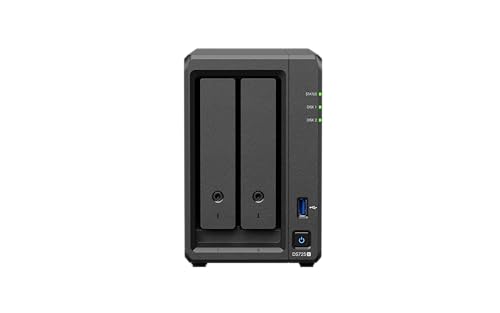
The 2-bay lineup is where most home users start. Synology offers four tiers: the entry-level DS223j, the mid-range DS223, the Plus-series DS225+, and the prosumer DS725+. The DS225+ adds an Intel processor, expandable memory and 2.5GbE networking, but it has no M.2 slots and Plex (a popular media-streaming app) hardware transcoding is not officially supported on the stock DSM configuration.
2-Bay Synology Models. AU Pricing 2026
 DS223j
|
 DS223
DS223
|
 DS225+
|
 DS725+
|
|
|---|---|---|---|---|
| Processor | Realtek RTD1619B ARM | Realtek RTD1619B ARM | Intel Celeron J4125 | AMD Ryzen R1600 |
| RAM | 1GB DDR4 | 2GB DDR4 | 2GB DDR4 (up to 6GB) | 4GB DDR4 ECC |
| NVMe cache slots | No | No | No | 2x M.2 2280 |
| PCIe expansion | No | No | No | No |
| Hardware transcoding | No | No | Not officially supported on stock DSM | No (no Quick Sync) |
| AU market price | about $322 | about $485 | about $599 | about $999 |
| Cheapest AU listing | $310 (CCPU Computers) | $449 (MSY, UMart, Computer Alliance) | $565 (CCPU Computers) | $979 (JW Computers) |
| Best for | Basic backup, file serving | Home NAS with extra RAM | Photo management, Time Machine, Plex direct play | Prosumer, expandable storage |
The DS225+ is the recommended 2-bay pick for most home users. The Intel Celeron J4125 supports Synology Photos workloads, but the DS225+ has no NVMe slots and Plex hardware transcoding is not officially supported on the stock DSM configuration. The DS725+ makes sense if you want AMD Ryzen ECC memory over the DS225+’s Intel platform, though it does not support hardware transcoding for Plex and has no PCIe (a high-speed internal expansion slot) expansion slot. Otherwise the DS225+ gives 90% of the capability at a little over half the DS725+'s price. Read our DS225+ review for full specifications and scoring.
4-Bay Models
DS923+ discontinued. The DS923+ has been superseded and is no longer sold new through Australian retailers or Amazon AU. The DS925+ is the current 4-bay model.
The 4-bay lineup is where Synology's range gets interesting for home labs, creative professionals, and small businesses. Four drives means RAID 5 is possible. Better capacity efficiency than RAID 1. The DS925+ is the current flagship 4-bay and a significant step up from the DS923+ it replaces.
4-Bay Synology Models. AU Pricing 2026
 DS423
DS423
|
 DS425+
|
 DS925+
|
|
|---|---|---|---|
| Processor | Realtek RTD1619B | Intel Celeron J4125 | AMD Ryzen V1500B |
| RAM | 2GB DDR4 | 2GB DDR4 (up to 6GB) | 4GB DDR4 ECC (up to 32GB) |
| NVMe cache slots | No | 2x M.2 2280 | 2x M.2 2280 |
| PCIe expansion | No | No | No |
| 10GbE onboard | No | No | No |
| ECC RAM | No | No | Yes |
| AU market price | about $655 | about $899 | about $1,099 |
| Cheapest AU listing | $628 (MSY, UMart, Computer Alliance, Computer & Parts Land) | $849 (Computer & Parts Land, Computer Alliance, MSY, Umart) | $995 (CCPU Computers) |
| Best for | Entry 4-bay file server | Home lab, small business, Plex direct play | 2026 flagship, same use as DS923+ |
The DS925+ replaced the DS923+ in this price bracket; the DS923+ is discontinued and no longer sold new through Australian retailers or Amazon AU. Both use AMD Ryzen processors capable of running virtual machines and Docker (software for running self-hosted apps in lightweight containers) containers. One regression worth knowing about: the DS923+ supported 10GbE (a fast 10-gigabit network connection) via an optional PCIe card, while the DS925+ has no PCIe expansion slot. The DS425+ is the better value play if you do not need ECC RAM (extra error-correcting memory) or the DS925+'s greater virtual-machine capacity. It runs Plex Media Server and SMB file serving, but Plex hardware transcoding is not officially supported on the stock DSM configuration. See our DS925+ review and DS425+ review for full specifications and scoring.
5-Bay and 6-Bay Models
Synology's 5-bay and 6-bay models are designed for SMBs that need more raw capacity or want expansion room without moving to an 8-bay chassis. The DS1525+ supports up to two DX525 expansion units, a path to 15 drives total.
5-Bay Synology Models. AU Pricing 2026
 DS1525+
|
|
|---|---|
| Bays | 5 |
| Processor | AMD Ryzen V1500B |
| RAM | 8GB DDR4 ECC (up to 32GB) |
| PCIe | 1x Gen3 x2 network upgrade slot |
| Expansion units | Up to 2x DX525 (15 drives total) |
| AU market price | about $1,759 |
| Cheapest AU listing | $1,600 (CCPU Computers) |
| Best for | Growing SMB, expandable file server |
Outside the DiskStation range, Synology launched the FS200T in May 2026. This is a 6-bay FlashStation designed for home and small office use, running entirely on 2.5-inch SSDs rather than HDDs. It is aimed at buyers who need fast all-flash performance in a compact form, such as video editing scratch storage or high-IOPS database workloads at the small office level. One Australian retailer lists the FS200T: I-Tech, $1,813. The FS200T does not replace the DiskStation range and is not a direct upgrade path from any current Plus model.
8-Bay Models
DS1821+ discontinued. The DS1821+ has been superseded and Synology has discontinued it. The DS1825+ is the current 8-bay model.
The 8-bay range is firmly SMB territory in Australia. The DS1825+ is Synology's newest 8-bay, replacing the DS1821+. Synology has discontinued the DS1821+. The DS1825+ is the current pick.
8-Bay Synology Models. AU Pricing 2026
 DS1825+
|
|
|---|---|
| Processor | AMD Ryzen V1500B |
| RAM | 8GB DDR4 ECC (up to 32GB) |
| PCIe | 1x Gen3 x8 slot (x4 link) |
| 10GbE onboard | No (add-in card) |
| AU market price | about $1,999 |
| Cheapest AU listing | $1,899 (Computer & Parts Land, MSY, Umart) |
| Best for | New SMB deployment, PCIe expansion |
The DS1825+ is the recommended choice for new 8-bay purchases. It provides one PCIe Gen3 x8 slot operating with an x4 link. The DS1821+ is discontinued by Synology. The DS1825+ supports up to two DX525 units, while the DS1821+ supports up to two DX517 units; both scale to 18 drive bays.
August 2026: Synology Adds Lower-Specification NEO Models
Synology has added NEO versions of the DS725+, DS925+, DS1525+ and DS1825+.
Despite the new model names, these are not next-generation NAS systems. The NEO models use the same processors, networking, drive bays, expansion options, DSM software and chassis designs as the existing Plus versions. The difference is the supplied memory.
| NEO model | Standard model | Memory change |
|---|---|---|
| DS725neo+ | DS725+ | 4GB ECC becomes 4GB non-ECC |
| DS925neo+ | DS925+ | 4GB ECC becomes 4GB non-ECC |
| DS1525neo+ | DS1525+ | 8GB ECC becomes 4GB non-ECC |
| DS1825neo+ | DS1825+ | 8GB ECC becomes 4GB non-ECC |
Sources: Synology DS725+ / DS725neo+ product page, Synology DS925+ / DS925neo+ product page.
The range was not announced at COMPUTEX 2026; Synology subsequently announced it through official regional newsroom releases in August 2026. The models also appeared through regional Synology product pages, support documentation and international distributor listings. Source: Synology COMPUTEX 2026 announcement.
Australian Plus and neo+ pricing varies by model, retailer and remaining stock; compare current listings rather than assuming a fixed percentage saving. Current AU market prices: DS725neo+ about $959 (DS725+ about $999, with the neo model cheaper), DS925neo+ about $984 (DS925+ about $1,099, with the neo model cheaper), DS1525neo+ about $1,480 (DS1525+ about $1,759, with the neo model cheaper) and DS1825neo+ about $1,839 (DS1825+ about $1,999, with the neo model cheaper).
Buyers should compare NEO and Plus listings carefully. NEO pricing is being measured against the Plus range after its increase. A NEO system may not represent the same saving when compared with existing Plus stock bought earlier.
Our initial view is that the DS725neo+ and DS925neo+ could make sense where the price difference is substantial and ECC is not required. The DS1525neo+ and DS1825neo+ are harder to justify without a significant saving because they remove ECC and halve the supplied memory from 8GB to 4GB.
These are lower-cost x25 configurations, not the meaningful hardware refresh many Synology buyers have been waiting for.
For the full model-by-model breakdown, see our Synology NEO NAS Range Explained guide.
BeeStation. The Cloud-First Alternative
BeeStation is Synology's consumer-focused product that sits outside the traditional DiskStation lineup. It ships with drives pre-installed, connects directly to Synology's cloud relay service, and is managed via a simplified app rather than DSM. It is not a traditional NAS. BeeStation supports optional SMB local access; Docker is unavailable, while Plex Media Server is supported on BeeStation Plus BST170-8T only. It is a personal cloud backup and photo storage device.
BeeStation Models. AU Pricing 2026
 BST150-4T
|
 BST170-8T
|
|
|---|---|---|
| Storage included | 4TB HDD | 8TB HDD |
| OS | BeeStation OS (simplified) | BeeStation OS (simplified) |
| SMB/NFS shares | SMB (turn on SMB Service first) | SMB (turn on SMB Service first) |
| DSM apps (Plex, Docker) | No | Plex Media Server: Yes. Docker: No |
| AU market price | Not published (fewer than 3 retailers) | about $1,149 |
| Cheapest AU listing | $439 (Computer & Parts Land) | $1,099 (PLE Computers) |
| Best for | Personal cloud backup, iPhone/Android photos | Family cloud backup, larger photo library |
BeeStation is not a traditional NAS. BeeStation supports SMB local access and Time Machine, and BeeStation Plus supports Plex Media Server; buy a DiskStation if you need Docker or the broader DSM package ecosystem. BeeStation is built for personal photo backup and cloud sync.
Synology 2026 Model Comparison. Which Should You Buy?
The right Synology depends on three things: how many drives you need, whether you need hardware transcoding or virtualisation, and your budget.
Synology 2026. Recommended Model by Use Case
| Recommended model | AU price | |
|---|---|---|
| Personal cloud backup (1 user) | DS223j or DS124 | DS223j: about $322; DS124: about $261 |
| Home NAS. Photos, Time Machine, Plex direct play | DS225+ | DS225+: about $599 |
| Home lab / power user | DS725+ or DS425+ | DS725+: about $999; DS425+: about $899 |
| Small business file server | DS425+ or DS925+ | DS425+: about $899; DS925+: about $1,099 |
| Power user / Docker / VMs | DS925+ | DS925+: about $1,099 |
| SMB with expansion needs | DS1525+ (DS1621+ is discontinued) | DS1525+: about $1,759 |
| Large SMB file server | DS1825+ | DS1825+: about $1,999 |
Where to Buy Synology NAS in Australia
Synology is widely stocked across Australian IT retailers. Scorptec stocks every current DiskStation on this page, and PLE Computers stocks most of them. MSY, UMart and Computer Alliance are often among the cheapest current listings. Full retailer comparison and warranty advice in our Where to Buy a NAS in Australia guide.
Synology's hardware warranty varies by model: the DS124, DS223, DS223j and DS423 carry two-year warranties, while the Plus models listed here generally carry three-year warranties. Australian Consumer Law rights are separate from the manufacturer's limited warranty. Avoid marketplace listings without local warranty confirmation.
Synology vs Competing Brands in 2026
Synology is widely stocked in Australia for home and SMB use, largely because DSM (DiskStation Manager) is the most polished NAS operating system available. Its main competitors in AU retail are QNAP (stronger on hardware, weaker on software polish), Asustor (competitive pricing, ADM OS), and UGREEN (newer entrant, competitive at the entry level). Full comparisons: Synology vs QNAP, Synology vs UGREEN, Synology vs Asustor.
Related reading: our NAS buyer's guide.
See also: our complete Synology NAS Australia guide.
What is the cheapest Synology NAS available in Australia in 2026?
The DS124 (1-bay) is available for about $269 AUD. For a 2-bay NAS with RAID capability, the DS223j sells for about $322 AUD.
Has Synology changed its pricing in 2026?
Australian retail prices changed during 2026 and vary by model, retailer and stock source; check current listings for the applicable price. Prices in this article are Australian market prices, the typical price across current AU retailer listings.
What is the best Synology NAS for Plex in Australia?
The DS225+ (2-bay) and DS425+ (4-bay) are the most cost-effective Synology options for Plex direct play. Both include Intel Celeron J4125 processors, but Plex hardware transcoding is not officially supported on their stock DSM configuration, so if you need transcoding, choose a model on Plex's supported NAS list. The DS925+ is the better choice if you also need Docker or VMs, though unlike the older DS923+ it has no PCIe expansion slot for a 10GbE card. See our Best NAS for Plex Australia guide for full picks.
What is the difference between the DS925+ and DS923+ in Australia?
The DS925+ uses the AMD Ryzen V1500B quad-core processor with ECC RAM and no PCIe expansion slot. The DS923+ it replaced used the older AMD Ryzen R1600 dual-core processor with ECC RAM and PCIe expansion for an optional 10GbE card. The DS923+ is now discontinued and no longer sold new through Australian retailers or Amazon AU, so the DS925+ is the current buy. The DS925+'s AU market price is about $1,099.
Does Synology have a 3-year warranty in Australia?
Warranty varies by model: the DS124, DS223, DS223j and DS423 carry two-year hardware warranties, while the Plus models listed here generally carry three-year hardware warranties. Grey-import purchases may not receive Synology's local voluntary manufacturer warranty. Your first step for a faulty product is usually the retailer that sold it. The ACCC explains your rights under the Australian Consumer Law at accc.gov.au.
Need help sizing a Synology NAS? Our NAS Sizing Wizard works out how many bays and what size drives you need from your data and its growth.