For most people in 2026, the best Synology home storage device is the DS225+. It holds two hard drives, connects at a speed fast enough to stream video without buffering, and runs Synology's software, widely considered the easiest home storage software available. For four drives, the DS925+ is the clear choice. This guide ranks every current Synology model by use case, from single-drive personal backup to eight-drive setups for home offices, with current Australian market prices throughout.
In short: For home backup and media serving, get the DS225+ (about $599). For a four-bay prosumer or home office setup, get the DS925+ (about $1,089). Budget buyers who don't need transcoding: DS223 (about $479). Business users with growing storage needs: DS1525+ (about $1,759). Every model reviewed with AU pricing below.
All Synology NAS Models Ranked
Prices shown below are current Australian market prices. Prices and stock can vary between retailers, so compare current listings before buying. The real difference is stock depth, pre-sales knowledge, and what happens when something goes wrong. For a broader comparison including QNAP, see our Best NAS Australia guide.
Synology NAS Models. AU Pricing
 DS124
DS124
|
 DS223
DS223
|
 DS225+
|
 DS423
DS423
|
 DS425+
|
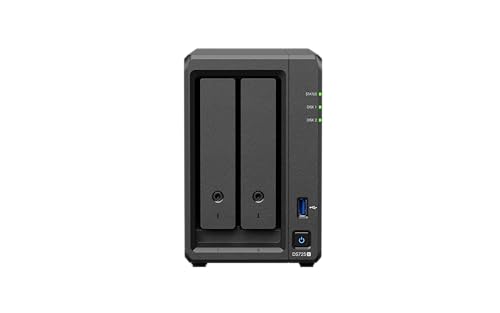 DS725+
|
 DS925+
|
 DS1525+
|
 DS1825+
|
|
|---|---|---|---|---|---|---|---|---|---|
| Bays | 1 | 2 | 2 | 4 | 4 | 2 | 4 | 5 | 8 |
| CPU | Realtek RTD1619B | Realtek RTD1619B | Intel Celeron | Realtek RTD1619B | Intel Celeron | AMD Ryzen R1600 | AMD Ryzen V1500B | AMD Ryzen V1500B | AMD Ryzen V1500B |
| RAM | 1 GB | 2 GB | 2 GB | 2 GB | 2 GB | 4 GB | 4 GB ECC | 8 GB ECC | 8 GB ECC |
| Network | 1GbE | 1GbE | 2.5GbE + 1GbE | 2x 1GbE | 2.5GbE + 1GbE | 1x 2.5GbE + 1x 1GbE | 2x 2.5GbE | 2x 2.5GbE | 2x 2.5GbE |
| M.2 Slots | 0 | 0 | 2 | 0 | 2 | 2 | 2 | 2 | 2 |
| AU market price | about $260 | about $479 | about $599 | about $639 | about $899 | about $999 | about $1,089 | about $1,759 | about $1,999 |
| Cheapest AU listing | $239 (Computer Alliance, MSY, UMart) | $449 (Computer Alliance, MSY, UMart) | $565 (CCPU Computers) | $628 (Computer & Parts Land, Computer Alliance, MSY, UMart) | $849 (Computer & Parts Land, Computer Alliance, MSY, UMart) | $979 (JW Computers) | $995 (CCPU Computers) | $1,600 (CCPU Computers) | $1,899 (Computer & Parts Land, MSY, UMart) |
Best Overall. Synology DS225+
The DS225+ is the Synology to buy in 2026 for most Australian home users and prosumers. The DS225+ has a market price of about $599 and follows the DS224+ generation with the same Intel Celeron platform. It has 2.5GbE networking (plus a 1GbE port) and two M.2 NVMe cache slots in a quiet two-bay enclosure. Plex hardware transcoding is not officially supported on the DS225+.
What makes the DS225+ the default recommendation is the full DSM experience. Docker support via Container Manager, Synology Drive for private cloud sync, Hyper Backup for automated offsite backups, Active Backup for Business, and Surveillance Station with two free camera licences. For a deeper look at how Synology compares to QNAP, see our Synology vs QNAP Australia comparison.
| CPU | Intel Celeron (4-core, 2.0 GHz) |
|---|---|
| RAM | 2 GB DDR4 (expandable to 6 GB) |
| Drive Bays | 2x 3.5" SATA (hot-swappable) |
| M.2 Slots | 2x NVMe (cache or storage pool) |
| Network | 1x 2.5GbE + 1x 1GbE RJ45 |
| USB | 2x USB 3.2 Gen 1 |
| AU market price | about $599 |
| Scorptec Price | $599 |
| PLE Price | $599 |
Pros
- Intel CPU, but Plex hardware transcoding is not officially supported on the DS225+
- 2.5GbE networking. Future-proofed for faster home networks
- Full DSM software suite including Docker, Drive, Hyper Backup
- Widely stocked by Australian retailers. No wait times
Cons
- 2 GB RAM as standard, expandable to 6 GB. Heavy Docker users may still want the memory upgrade
- Only two bays. Maximum raw capacity around 48 TB
- M.2 NVMe slots still require Synology-approved drives for new storage pools
- No 10GbE option or PCIe slot for expansion
Best Four-Bay. Synology DS925+
The DS925+ is the four-bay pick for buyers who need more capacity and data protection than two bays can offer. The DS925+ has a market price of about $1,089. Its AMD Ryzen V1500B CPU, 4 GB ECC RAM (upgradeable to 32 GB), and dual 2.5GbE ports justify the step up from the DS425+. Four bays in SHR-1 with 8 TB Synology HAT3320-8T drives (about $814 each) gives roughly 24 TB usable. The ECC RAM protects against memory errors. A genuine concern for 24/7 operation with irreplaceable data. For drive recommendations, see our Best NAS Hard Drive Australia guide.
The DS925+ also supports the DX525 expansion unit (about $869), adding five more bays without data migration. If your storage needs grow, you're not rebuilding from scratch. A key advantage over the DS425+.
| CPU | AMD Ryzen V1500B (4-core/8-thread, 2.2 GHz) |
|---|---|
| RAM | 4 GB DDR4 ECC (upgradeable to 32 GB) |
| Drive Bays | 4x 3.5" SATA (hot-swappable) |
| M.2 Slots | 2x NVMe (cache or storage pool) |
| Network | 2x 2.5GbE RJ45 |
| Expansion | 1x USB Type-C expansion port (supports DX525) |
| AU market price | about $1,089 |
| Cheapest AU listing | $995 (CCPU Computers) |
Pros
- 4 GB ECC RAM upgradeable to 32 GB. Handles Docker, VMs, and multitasking
- Dual 2.5GbE with link aggregation. 5 Gbps combined throughput
- DX525 expansion support. Grow to 9 bays without replacing the NAS
- Mature, well-stocked model at all major AU retailers
Cons
- No hardware transcoding. Plex transcoding is CPU-only (use direct play)
- No 10GbE built-in
- The DS925+ has a market price of about $1,089 before drives, so it is a significant investment
- M.2 NVMe restrictions. Only Synology-certified NVMe SSDs
Best Budget. Synology DS223
The DS223 suits buyers who want Synology's software without the Plus-series price. The DS223 has a market price of about $479. It delivers a solid two-bay experience with a Realtek RTD1619B quad-core CPU and 2 GB RAM. No Docker, no transcoding. But for file sharing, Time Machine backup, Synology Drive sync, and Hyper Backup to the cloud, it does the job reliably. DSM runs smoothly on this hardware for core NAS tasks.
If your budget is tighter, the DS223j at about $322 drops to 1 GB RAM but is arguably too compromised for 2026 workloads. The DS223 costs more, but the extra capability is well worth considering. The single-bay DS124 at about $260 exists as a dead-simple backup target, but offers no drive redundancy.
| CPU | Realtek RTD1619B (4-core, 1.47 GHz) |
|---|---|
| RAM | 2 GB DDR4 (not upgradeable) |
| Drive Bays | 2x 3.5" SATA |
| Network | 1x 1GbE RJ45 |
| USB | 3x USB 3.2 Gen 1 |
| Cheapest AU listing | $449 (Computer Alliance, MSY, UMart) |
| AU market price | about $479 |
| Warranty | 2-year hardware warranty |
Pros
- Full DSM experience. Synology Drive, Hyper Backup, Synology Photos
- Cheapest two-bay Synology with 2 GB RAM
- Low power consumption. Synology rates the DS223 at 17.343 W during access and 14.6 dB(A) under its noise test conditions
- Strong stock availability at all major AU retailers
Cons
- Container Manager is supported, but the ARM-based CPU limits compatibility with containers that are only built for x86
- No hardware transcoding. Plex requires direct play only
- 1GbE networking only. Capped at ~112 MB/s
- No M.2 NVMe slots
Best for Plex. Synology DS425+
The DS425+ is a four-bay Intel model, but Plex hardware transcoding is not officially supported on Synology's x25 DSM platform. The DS425+ has a market price of about $899 and uses the same Intel Celeron as the DS225+. It has 2.5GbE plus 1GbE and two M.2 NVMe slots. The DS425+ can perform some software transcoding, but Plex hardware transcoding is not officially supported and transcoding performance depends heavily on codec, bitrate and resolution.
The trade-off versus the DS925+ is clear: the DS425+ has 2 GB RAM expandable to 6 GB and no external bay-expansion option, while Plex hardware transcoding is not officially supported on the x25 DSM platform. The DS925+ gives you upgradeable ECC RAM, dual 2.5GbE, and DX525 expansion, but no transcoding. Choose based on whether media streaming or storage growth is your priority.
| CPU | Intel Celeron (4-core, 2.0 GHz) |
|---|---|
| RAM | 2 GB DDR4 (not upgradeable) |
| Drive Bays | 4x 3.5" SATA (hot-swappable) |
| M.2 Slots | 2x NVMe |
| Network | 1x 2.5GbE + 1x 1GbE RJ45 |
| Cheapest AU listing | $849 (Computer & Parts Land, Computer Alliance, MSY, UMart) |
| AU market price | about $899 |
| Warranty | 3-year hardware warranty |
Pros
- Intel J4125 CPU, but Plex hardware transcoding is not officially supported on the DS425+
- 2.5GbE networking out of the box
- Four bays with SHR for media libraries
- Two M.2 NVMe slots for SSD cache
Cons
- 2 GB RAM as standard, expandable to 6 GB. The base configuration limits Docker headroom
- No expansion support. Four bays is your ceiling
- The DS425+ has a market price of about $899, while the DS925+ has a market price of about $1,089 and offers more upgrade potential
- Single 2.5GbE vs dual on the DS925+
Premium Two-Bay. DS725+ and Business Models. DS1525+, DS1825+
The DS725+ has a market price of about $999 and is a niche pick. A two-bay NAS with AMD Ryzen R1600, 4 GB upgradeable ECC RAM, one 2.5GbE port, and one 1GbE port. It suits buyers who want compute performance for Docker containers (Home Assistant, Pi-hole) in a compact form factor. The four-bay DS925+ has a market price of about $1,089 and uses a different Ryzen V1500B CPU, starts with the same 4 GB ECC memory, and adds two internal bays plus DX525 expansion support. Don't buy the DS725+ purely for storage. It only makes sense if you specifically need a two-bay form factor with Plus-series power.
The DS1525+ (5-bay, about $1,699) and DS1825+ (8-bay, about $1,999) are the business workhorses. Both offer 8 GB ECC RAM upgradeable to 32 GB and DX525 expansion support. The DS1525+ runs the Ryzen V1500B with two 2.5GbE ports; the DS1825+ uses the Ryzen V1500B with dual 2.5GbE. For small businesses running Active Backup across multiple PCs, Synology Drive for team collaboration, and Hyper Backup for offsite replication, these are the right starting points. For more on Synology in the Australian market, see our Synology NAS Australia overview.
Value Models and Rackmount
Synology's value-series models (DS124, DS223j, DS423) use Realtek ARM CPUs and limited RAM. They run DSM competently for basic tasks but lack Docker, transcoding, and M.2 NVMe slots. The DS423 ($679 Scorptec) is the standout here. Four bays with SHR redundancy, priced below the DS425+. The DS124 (about $260) and DS223j (about $322) are too compromised to recommend when the DS223 at about $479 offers a far better experience.
For rackmount, the RS422+ ($1,599 Scorptec) is the entry point. A 1U, four-bay unit. The newer RS826+/RS826RP+ and RS1226+/RS1226RP+ now sit in these compact rackmount tiers, while older RS822+ and RS1221+ stock may still be available. The desktop DS1823xs+ (about $3,310) delivers eight bays with Ryzen V1780B and 10GbE built in for businesses without rack infrastructure. Confirm current stock with the retailer before ordering. For business, education and government purchases, ask for a formal quote rather than paying the listed retail price.
The Drive Compatibility Question
In April 2025, Synology locked new Plus-series models to Synology-branded drives. The enthusiast community reacted with justified fury, and Synology reversed course with DSM 7.3 in October 2025. Restoring third-party 3.5-inch HDD and 2.5-inch SATA SSD support on desktop Plus-series models. DSM 7.3 allows affected desktop Plus models to install and create storage pools with non-validated third-party HDDs, but drives on Synology's incompatibility list remain unsupported and the model-specific compatibility list should still be checked.
Limitations that remain: M.2 NVMe SSDs still require drives from Synology's Hardware Compatibility List for cache or storage pool creation. Enterprise and rackmount models (RS, FS, SA, XS series) continue to enforce stricter drive compatibility. Always check the HCL for your specific model before purchasing drives.
NAS hard drive prices have risen significantly from 2025 levels globally, and Australian NAS-drive pricing can differ from US retail pricing and varies by model, capacity, retailer and current stock conditions. For specific AU pricing and recommendations by capacity, see the Best NAS Hard Drive Australia guide, or the AU pricing section below.
🇦🇺 Australian Buyers: What You Need to Know
If you plan to access your Synology remotely. Synology Drive sync, Photos while travelling, surveillance monitoring. Your NBN upload speed is the bottleneck. NBN upload speed varies by access technology and retail plan. On eligible FTTP/HFC services, Home Fast is now a 500/50 Mbps wholesale tier, while other NBN technologies and products have different upload limits. Fine for documents and photos, but video streaming may need transcoding to lower bitrates.
Watch out for CGNAT (Carrier-Grade NAT). Some ISPs on fixed wireless, satellite NBN, or budget MVNOs place customers behind CGNAT, blocking direct remote access. Synology's QuickConnect relay works around it but with reduced performance. Confirm you have a public IPv4 address if remote access matters to you.
For non-technical users who want private cloud backup without DSM or RAID, Synology's BeeStation range: the 4 TB and BeeStation Plus 8 TB are sealed appliances with automatic phone and PC backup. No configuration needed. The trade-off: zero flexibility, no expansion, no redundancy. A single drive failure means data loss without an external backup.
Buying Tips and Consumer Rights
Where to buy: Scorptec and PLE list the widest Synology range with competitive pricing. Mwave is reliable. For first-time buyers, choose a specialist where you can get pre-sales guidance. Not Amazon where the price is better but the support is nonexistent.
Budget for drives separately. Every Synology NAS ships diskless. Don't over-buy on bays. Two is plenty for most home users, four for prosumers, five or eight for business. Ask about warranty before buying: "If this fails, what's your process? Can I get an advanced replacement?" In Australia, your warranty claim goes to the retailer, not Synology. And Synology has no service centre here. Business buyers: request a formal quote. For business, education and government purchases, ask for a formal quote rather than paying the listed retail price.
Australian Consumer Law note: ACL protections apply when purchasing from Australian retailers. Under the ACL, the seller is responsible for resolving applicable consumer-guarantee problems and cannot simply refer you to the manufacturer; for some guarantees, consumers may also seek certain remedies from the manufacturer. Whether a dead NAS counts as a major or minor failure under ACL depends on the situation, not a fixed rule. It's a major failure if it can't be used for its normal purpose and can't easily be fixed within a reasonable time, in which case you choose a refund or replacement. Otherwise it's treated as minor, and the retailer can choose to repair or replace it first, though you can request a refund if they can't fix it within a reasonable time. Warranty and repair turnaround varies by retailer, fault assessment and remedy, but a replacement through the retailer and distributor typically takes about 2-3 weeks. A NAS is not a backup. Plan your data protection strategy around the assumption that hardware will eventually fail. For official information, visit accc.gov.au.
Which Synology Should You Actually Buy?
The decision simplified:
- "Cheapest Synology for backup." DS223 (about $479).
- "Proper NAS with Docker and fast networking." DS225+ (about $599).
- "Four bays and I use Plex." DS425+ (about $899).
- "Four bays with upgrade headroom." DS925+ (about $1,089).
- "Small business, multiple users, need to scale." DS1525+ (about $1,759) or DS1825+ (about $1,999).
- "Just works, never see a settings screen." BeeStation Plus 8 TB.
Pick based on how many bays you need and whether transcoding matters. DSM is the same across the entire Plus range. The experience is consistent regardless of model. Gone are the days of waiting for Black Friday to buy tech in Australia. Retailers run rolling sale events throughout the year, and in 2026 with storage supply chain constraints tightening, the stock might not be there when you finally decide to pull the trigger.
Related reading: our AU retailer guide.
Use our free NAS Sizing Wizard to work out how many bays and what size drives you need.
See also: our complete Synology ecosystem guide.
Found the right NAS for your Synology NAS? Our expert build review checks your full configuration. Compatible drives, RAID, and DSM config. Before you spend. $149 AUD, delivered within 3 business days.
See also: our complete Synology NAS Australia guide.
See also: our complete Synology ecosystem guide.
Is the Synology DS225+ worth the extra money over the DS223?
Yes, for most buyers. The DS225+ adds 2.5GbE networking, expandable memory and x86 Container Manager support, but it has no M.2 NVMe slots and Plex hardware transcoding is not officially supported on the x25 DSM platform. The DS225+ costs more (DS225+ about $599, DS223 about $479). Unless your NAS will only do basic file sharing with no transcoding or containers, the DS225+ is the better investment.
Can I use Seagate IronWolf or WD Red drives in a new Synology NAS?
Yes. Since DSM 7.3 (October 2025), Synology restored full third-party 3.5-inch HDD support on desktop Plus-series models. DSM 7.3 permits non-validated third-party HDDs on affected desktop Plus models, but check the model-specific compatibility list because drives classified as incompatible remain unsupported. The only remaining restriction is M.2 NVMe SSDs, which require Synology-certified models. Enterprise and rackmount models maintain stricter compatibility requirements.
What is the total cost of a Synology NAS setup in Australia?
Budget for the NAS plus drives. The DS225+ is about $599 and the DS223 about $479, each holding two drives; the four-bay DS925+ is about $1,089 and holds four. NAS-drive prices change over time and vary substantially by model and capacity, so use current Australian retailer pricing when budgeting. Budget accordingly.
Should I buy a Synology NAS from Amazon Australia?
Amazon AU works if you're technically confident and don't need support. Their returns process is excellent. But if your NAS fails and you need a replacement, Amazon may not have stock. They'll push to give you a credit rather than sourcing a like-for-like unit. Specialist retailers like Scorptec or PLE can access distributor and vendor stock to find replacements. For first-time buyers or business-critical deployments, buy from a specialist.
How does Synology warranty work in Australia?
Synology has no service centre in Australia. Warranty handling and escalation paths vary by seller and fault assessment; ask the retailer for its current process and expected turnaround. Warranty length varies by model: Value and J-series models such as DS223, DS223j and DS423 carry two-year hardware warranties, while current Plus models such as DS225+ carry three years, with extension options on eligible models and regions. Under the ACL, the retailer has direct obligations to resolve applicable consumer-guarantee problems; for some guarantees, consumers may also seek certain remedies from the manufacturer. Advanced replacements are generally unavailable. Some resellers will let you buy a replacement at full price and refund you when the faulty unit returns.
DS425+ or DS925+. Which four-bay Synology should I buy?
Neither model should be chosen on the assumption of supported Plex hardware transcoding: the DS425+ contains an Intel J4125 but Synology does not officially expose its Quick Sync hardware on the x25 DSM platform, while the DS925+ uses an AMD Ryzen V1500B without Intel Quick Sync. DS925+ (about $1,089) for everything else. Upgradeable ECC RAM, dual 2.5GbE link aggregation, DX525 expansion support, and stronger multi-threaded performance. The DS925+ is more future-proof.
Can I access my Synology NAS remotely over NBN?
Yes, via QuickConnect or direct DDNS. Upload speed is the bottleneck. NBN upload speed depends on your access technology and retail plan; eligible FTTP/HFC Home Fast services now use a 500/50 Mbps wholesale tier, while other NBN products have different upload limits. Fine for documents and photos, but video streaming may need transcoding. If your ISP uses CGNAT (common on fixed wireless and budget MVNOs), direct DDNS won't work. You'll need QuickConnect's relay. Check with your ISP for a public IPv4 address.
Is a two-bay or four-bay NAS better for home use?
Two bays is sufficient for most home users. Two drives in SHR give single-drive redundancy. If one fails, your data is protected while you replace it. Two 8 TB drives in SHR give roughly 8 TB usable, plenty for years of photos, documents, and backups. Four bays suit users who need more than 16 TB, want dual-drive redundancy (SHR-2), or run a home office with multiple users.
Looking for the best NAS across all brands? Our comprehensive guide covers Synology, QNAP, Asustor, and more with live Australian pricing.