QNAP makes home and business storage devices, boxes that connect to your network and give every computer, phone, and screen in your home or office access to the same files. Their Australian range in 2026 covers more than 30 models, from the TS-133 at about $286 to large rack-mounted systems used in professional environments. This guide covers a selection of QNAP models available in Australia with current Australian market prices.
In short: For most home and SOHO users the TS-464 (4-bay) is QNAP's best all-round NAS. Dual 2.5GbE, M.2 cache slots, quad-core Celeron, RAID 5 or 6 capable. Budget 2-bay: TS-264. Budget 4-bay: TS-433. Performance with PCIe expansion: TS-473A or TS-673A (Ryzen). Full breakdown below.
QTS: The Software Behind Every QNAP NAS
Many QNAP NAS models run QTS; others run QuTS hero or QES, and some models support switching between QTS and QuTS hero. QTS handles file sharing (SMB, NFS, AFP, FTP), user and permission management, scheduled backups, DLNA/Plex media serving, and a downloadable app ecosystem via the App Center. QNAP's key software differentiator is Container Station, a first-class Docker and Docker Compose environment built directly into the OS. For homelab users who want to run Nextcloud, Jellyfin, Home Assistant, or Portainer alongside their NAS, Container Station is genuinely excellent.
Some high-end models run QuTS Hero instead, a ZFS-based OS variant used by the TVS-h series. QuTS Hero adds native ZFS pools, inline deduplication and compression, and enterprise data integrity at the cost of higher RAM requirements and a more complex initial setup. Many desktop TS-series units use QTS by default, but supported models can switch to QuTS hero; switching requires reinitialising the NAS and erases existing data.
1-Bay NAS: TS-133
The TS-133 is QNAP's entry point, a single-drive unit for simple backup, a lightweight personal cloud, or a secondary NAS node in a larger setup. The ARM processor handles basic file serving and backup tasks. Do not expect Plex transcoding, Docker containers, or meaningful SSD cache.
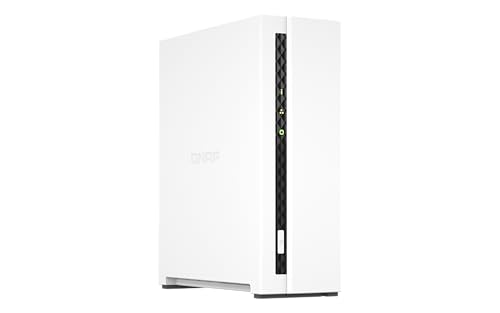
| CPU | ARM Cortex-A55 quad-core 1.8GHz |
|---|---|
| RAM | 2GB DDR4 (not upgradeable) |
| Bays | 1 × 3.5"/2.5" SATA |
| Network | 1 × 1GbE |
| M.2 Slots | Not included |
| USB | 1 × USB 3.2 Gen 1, 1 × USB 2.0 |
| AU market price | about $286 |
| Best For | Single-drive personal backup, learning QTS on a minimal budget |
2-Bay NAS
QNAP's 2-bay range includes additional current models beyond the four covered here, including the HS-264. The TS-233 is the ARM budget option. The TS-216G adds one 2.5GbE port alongside one 1GbE port at an affordable price. The TS-264 is the Celeron mid-range sweet spot. The TS-253E is a higher-spec Celeron for workloads where higher sustained throughput matters. The jump from ARM to Celeron is significant in practice. Celeron handles Plex transcoding and Docker containers where ARM struggles.
TS-233. Budget 2-Bay

| CPU | ARM Cortex-A55 quad-core 2.0GHz |
|---|---|
| RAM | 2GB DDR4 (not upgradeable) |
| Bays | 2 × 3.5"/2.5" SATA |
| Network | 1 × 1GbE |
| M.2 Slots | Not included |
| AU market price | about $402 |
| Best For | RAID 1 personal backup, basic shared file access on a tight budget |
The TS-233 is the cheapest path to RAID 1 redundancy in a proper QTS environment. The ARM CPU is adequate for file transfers and basic app use, including QTS's excellent backup suite. But the non-upgradeable 2GB RAM and single 1GbE port are real limits. It is not for Plex or Docker in any meaningful sense. If those are likely requirements, go straight to the TS-264.
TS-216G. Mid-Point 2-Bay with 2.5GbE

| CPU | ARM Cortex-A55 quad-core 2.0GHz |
|---|---|
| RAM | 4GB DDR4 |
| Bays | 2 × 3.5"/2.5" SATA |
| Network | 1 × 2.5GbE, 1 × 1GbE |
| M.2 Slots | Not included |
| AU market price | about $551 |
| Best For | 2.5GbE home network future-proofing without paying for a Celeron |
The TS-216G sits between the TS-233 and TS-264. It keeps the ARM CPU but doubles the RAM to 4GB and adds a 2.5GbE port. For users who primarily want faster local throughput on a 2.5GbE network without the full Celeron premium, it is a reasonable bridge. It is still not suited for transcoding or heavy container workloads.
TS-264. Best 2-Bay for Most Users

| CPU | Intel Celeron N5095 quad-core 2.9GHz (burst) |
|---|---|
| RAM | 8GB DDR4 (upgradeable to 16GB) |
| Bays | 2 × 3.5"/2.5" SATA |
| Network | 2 × 2.5GbE |
| M.2 Slots | 2 × PCIe Gen 3 (NVMe SSD cache) |
| USB | 2 × USB 3.2 Gen 2, 2 × USB 2.0 |
| HDMI | 1 × HDMI 2.0 |
| AU market price | about $1,014 |
| Best For | Home Plex server, Docker containers, 2.5GbE homelab, HDMI direct-to-TV output |
The TS-264 is the 2-bay model most home and SOHO users should consider. The Celeron N5095 handles Plex direct play for multiple concurrent streams and light 1080p transcoding. Dual 2.5GbE supports link aggregation or a separate management interface. Two M.2 PCIe slots for NVMe SSD cache, rare at this bay count and price, meaningfully accelerate small-file and random I/O workloads. HDMI 2.0 output means you can connect it directly to a TV or monitor for local Plex playback without a separate client. The TS-264 has a market price of about $1,014.
TS-253E. Celeron J6412 2-Bay
| CPU | Intel Celeron J6412 quad-core 2.0GHz (burst 2.6GHz) |
|---|---|
| RAM | 8GB DDR4 (upgradeable to 16GB; ECC not supported) |
| Bays | 2 × 3.5"/2.5" SATA |
| Network | 2 × 2.5GbE |
| M.2 Slots | 2 × PCIe Gen 3 |
| Cheapest AU listing | $1,099 (Computer & Parts Land, Scorptec) |
| Best For | SMB file server with higher sustained throughput under concurrent access |
The TS-253E uses the Celeron J6412. For home use the day-to-day experience is essentially identical to the TS-264. For most home buyers the TS-264, with a market price of about $1,014, is the better purchase.
4-Bay Entry: TS-433 and TS-462
The TS-433 is an ARM entry model; QNAP now lists the Intel-based TS-462 configurations as legacy. Both support RAID 5 and RAID 6 for three or four-drive protection. The ARM CPU on the TS-433 is adequate for a passive backup destination or media storage server accessed by one or two users. The TS-462's dual-core Celeron handles light Plex and Docker use with upgradeable RAM. The TS-433 has no M.2 cache slots. The TS-462 includes two M.2 2280 PCIe Gen 3 NVMe slots for SSD caching.
TS-433. ARM 4-Bay Entry

| CPU | ARM Cortex-A55 quad-core 2.0GHz |
|---|---|
| RAM | 4GB DDR4 (not upgradeable) |
| Bays | 4 × 3.5"/2.5" SATA |
| Network | 1 × 2.5GbE, 1 × 1GbE |
| M.2 Slots | Not included |
| AU market price | about $699 |
| Best For | Entry 4-bay RAID 5 backup server, media storage, basic shared access |
TS-462. Legacy Celeron 4-Bay Entry

| CPU | Intel Celeron N4505 dual-core 2.9GHz (burst) |
|---|---|
| RAM | 4GB DDR4 (upgradeable to 16GB) |
| Bays | 4 × 3.5"/2.5" SATA |
| Network | 1 × 2.5GbE |
| M.2 Slots | 2 × M.2 2280 PCIe Gen 3 (NVMe SSD cache) |
| AU market price | about $932 |
| Best For | Budget 4-bay with Plex capability and upgradeable RAM |
Between these two the TS-462, which QNAP now lists as legacy, is the better starting point for active workloads. The Intel Celeron handles Plex direct play and a light container or two, and the RAM is upgradeable to 16GB. The TS-433 ARM CPU is genuinely adequate only for passive backup and file serving. Neither is compelling when the TS-464 costs more than the TS-462 and the TS-433, and includes dual 2.5GbE plus the M.2 slots the TS-433 lacks. For most buyers the TS-464 is the better decision even at a stretch.
4-Bay Mid-Range: TS-464. The Volume Leader
| CPU | Intel Celeron N5095 quad-core 2.9GHz (burst) |
|---|---|
| RAM | 8GB DDR4 (upgradeable to 16GB) |
| Bays | 4 × 3.5"/2.5" SATA |
| Network | 2 × 2.5GbE |
| M.2 Slots | 2 × PCIe Gen 3 (NVMe SSD cache) |
| USB | 2 × USB 3.2 Gen 2, 2 × USB 3.2 Gen 1 |
| PCIe | 1 × PCIe Gen 3 x2 expansion slot |
| AU market price | about $1,129 |
| Best For | Home media server, Plex with transcoding, Docker homelab, SOHO shared storage, RAID 5/6 |
The TS-464 is positioned as a home and SOHO model. The N5095 quad-core handles 1080p Plex transcoding, multiple simultaneous Docker containers, and fast SMB transfers. Dual 2.5GbE supports link aggregation to a modern 2.5GbE switch for consistent ~500MB/s throughput across the network. Two M.2 PCIe Gen 3 slots for NVMe SSD cache accelerate random I/O significantly, which is particularly valuable for VM storage, database workloads, or any use case with many small files.
The TS-464 has one PCIe Gen 3 x2 expansion slot and supports compatible 5GbE and 10GbE network cards. Step up to the TS-473A when you need two PCIe Gen 3 x4 slots, ECC memory, or more than 16GB of RAM. For everything else, the TS-464 is the correct answer. Use the RAID usable capacity calculator to plan your storage pool before buying drives.
4-Bay All-Flash: TBS-464 NASbook
| CPU | Intel Celeron N5105 quad-core 2.0GHz (burst 2.9GHz) |
|---|---|
| RAM | 8GB DDR4 (not expandable) |
| Bays | 4 × M.2 2280 NVMe only (no 3.5" SATA) |
| Network | 2 × 2.5GbE |
| Form Factor | Compact desktop. Significantly smaller than a standard tower NAS |
| AU market price | about $1,379 |
| Best For | All-flash compact NAS, VM storage, silent home office use, high IOPS workloads |
The TBS-464 ("NASbook") is a niche but compelling product. It holds four M.2 NVMe SSDs only, with no spinning drive bays at all. This eliminates spinning-drive noise and keeps the unit extremely compact, but it is not fanless. The trade-off is cost per terabyte. The TBS-464 enclosure has a market price of about $1,379, and adding four M.2 SSDs makes the total investment significantly higher than an equivalent spinning disk array. The TBS-464 is not a replacement for a standard 4-bay. It is a complement, suited to VM hosting, database storage, or a fast home office file server where noise matters.
4-Bay Performance: TS-473A

| CPU | AMD Ryzen V1500B quad-core / 8-thread 2.2GHz |
|---|---|
| RAM | 8GB DDR4 (ECC supported; upgradeable to 64GB) |
| Bays | 4 × 3.5"/2.5" SATA |
| Network | 2 × 2.5GbE |
| M.2 Slots | 2 × PCIe Gen 3 |
| PCIe | 2 × PCIe Gen 3 × 4 expansion slots |
| AU market price | about $1,498 |
| Best For | 10GbE via PCIe NIC, VM hosting with ECC RAM, power users who need PCIe flexibility |
The TS-473A steps up from the TS-464 with an AMD Ryzen V1500B, a server-class CPU with 8 threads, ECC memory support up to 64GB, and sustained throughput under concurrent load that the Celeron cannot match. The two PCIe Gen 3 x4 slots are the headline feature: add a QNAP QXG-10G2T-X710 NIC for 10GbE, or a supported GPU for hardware transcoding and AI inference. ECC RAM is important for long-running ZFS-style workloads and protects against silent bit corruption in VM and database storage. The TS-473A is the last 4-bay QNAP most demanding home and SOHO users will ever need.
6-Bay NAS: TS-664 and TS-673A
The 6-bay tier enables RAID 6 across six drives, tolerating two simultaneous drive failures while delivering usable capacity that exhausts most home storage needs for years. The TS-664 uses the Celeron N5095 familiar from the TS-464. The TS-673A brings the Ryzen V1500B and two PCIe Gen 3 x4 slots to the 6-bay form factor.
TS-664. 6-Bay Celeron

| CPU | Intel Celeron N5095 quad-core 2.9GHz (burst) |
|---|---|
| RAM | 8GB DDR4 (upgradeable to 16GB) |
| Bays | 6 × 3.5"/2.5" SATA |
| Network | 2 × 2.5GbE |
| M.2 Slots | 2 × PCIe Gen 3 |
| AU market price | about $1,678 |
| Best For | RAID 6 home media library, large photo archive, SOHO array exceeding 4-bay capacity |
TS-673A. 6-Bay Ryzen with PCIe

| CPU | AMD Ryzen V1500B quad-core / 8-thread 2.2GHz |
|---|---|
| RAM | 8GB DDR4 (ECC supported; upgradeable to 64GB) |
| Bays | 6 × 3.5"/2.5" SATA |
| Network | 2 × 2.5GbE |
| M.2 Slots | 2 × PCIe Gen 3 |
| PCIe | 2 × PCIe Gen 3 × 4 expansion slots |
| AU market price | about $1,899 |
| Best For | 6-bay with 10GbE, high-throughput shared storage for multiple users, production VM hosting |
The TS-673A's two PCIe Gen 3 x4 slots provide greater expansion bandwidth than the TS-664's single PCIe Gen 3 x2 slot. Pair it with a 10GbE NIC and you have a 6-bay array capable of saturating a 10GbE switch. This suits small production environments with multiple concurrent users accessing large files, including video editing, CAD, and surveillance. With the TS-673A at a market price of about $1,899 plus the cost of the NIC, this combination delivers enterprise-grade throughput at a fraction of rack-mount pricing.
8-Bay, 9-Bay, and Larger
QNAP's desktop 8-bay+ range is dominated by two families. The TS-832PX (8-bay, Alpine AL-324 quad-core 1.7GHz, built-in 10GbE + 2.5GbE, about $2,108) is notable for its built-in 10GbE without needing a PCIe add-in card, a cost and configuration advantage for environments where 10GbE is the priority. The TS-873A (8-bay, Ryzen V1500B, 8GB RAM with ECC support, PCIe expansion, about $2,499) is the Ryzen option for workloads demanding higher CPU throughput and PCIe flexibility. The TS-873A has two M.2 NVMe SSD slots; the TS-832PX takes M.2 SSD cache through a QM2 PCIe card.
The TS-932PX is a unique 9-bay hybrid: 5 × 3.5" bays plus 4 × 2.5" SATA bays, built-in 10GbE and 2.5GbE, Alpine AL-324 CPU. At about $1,120, it is the most affordable desktop QNAP with built-in 10GbE. The asymmetric bay layout suits a tiered storage strategy: SSDs in the 2.5" slots for hot data, HDDs in the 3.5" bays for bulk storage.
TVS-h Hero Series: ZFS-Powered QNAP
The TVS-h series runs QuTS Hero, QNAP's ZFS-based OS. Current models include the TVS-h674 (6-bay, Core i3 or Core i5 options, up to 64GB RAM) and TVS-h874 (8-bay, TVS-h874-i5-32G or TVS-h874-i7-32G options, up to 64GB RAM). QNAP lists the TVS-h874X-i9-64G as "By Request". QuTS Hero adds ZFS storage pools with inline deduplication, compression, and snapshots, providing enterprise-grade data integrity for backup infrastructure, surveillance, or any environment where a silent bit error would be catastrophic. The TVS-h674 has a market price of about $3,755, and the TVS-h874 has a market price of about $6,108.
QuTS Hero is worth considering when ZFS data-integrity features and properly resourced deduplication matter more than simplicity. For home and SOHO users, standard QTS with RAID 5 or RAID 6 provides more than adequate protection at a fraction of the price.
How to Choose the Right QNAP
QNAP Model Selector by Use Case
| TS-233 | TS-264 | TS-433 | TS-464 | TS-473A | TS-673A | |
|---|---|---|---|---|---|---|
| Bays | 2 | 2 | 4 | 4 | 4 | 6 |
| CPU Tier | ARM entry | Celeron mid | ARM entry | Celeron mid | Ryzen perf | Ryzen perf |
| Base RAM | 2GB fixed | 8GB / 16GB max | 4GB fixed | 8GB / 16GB max | 8GB / 64GB max (ECC supported) | 8GB / 64GB max (ECC supported) |
| Network | 1GbE | 2 × 2.5GbE | 2.5GbE + 1GbE | 2 × 2.5GbE | 2 × 2.5GbE | 2 × 2.5GbE |
| M.2 NVMe Cache | No | 2 slots | No | 2 slots | 2 slots | 2 slots |
| PCIe Expansion | No | Yes (×2) | No | Yes (×2) | Yes (×4) | Yes (×4) |
| 10GbE Option | No | PCIe NIC | No | PCIe NIC | PCIe NIC | PCIe NIC |
| Plex Transcoding | No | Light 1080p | No | 1080p / light 4K | CPU only (GPU via PCIe) | CPU only (GPU via PCIe) |
| AU market price | about $402 | about $1,014 | about $699 | about $1,129 | about $1,498 | about $1,899 |
| Cheapest AU listing | $369 (Computer & Parts Land) | $940 (CCPU Computers) | $649 (Computer Alliance) | $1,049 (Scorptec) | $1,359 (Computer & Parts Land, MSY, UMart) | $1,749 (MSY, UMart) |
Decision guidance: most first-time NAS buyers should default to the 4-bay TS-464 rather than a 2-bay. The extra bays cost relatively little at this tier and avoid regret when drives fill. Move to the TS-473A only if you need two PCIe Gen 3 x4 slots (for example a network card and a GPU together), ECC RAM, or more than 16GB of RAM. Choose 6-bay when your planned array exceeds 4 × 16TB, or when RAID 6 with meaningful remaining capacity is required. Considering Synology instead? See the Synology vs QNAP comparison for a direct head-to-head on software, hardware, and AU pricing.
🇦🇺 Australian Buyers: What You Need to Know
Where to buy QNAP in Australia: QNAP is broadly available across Australian retailers. PLE Computers, Scorptec, Computer Alliance, Umart, MSY, and CPL all carry the mainstream lineup. PLE and Scorptec have the widest model range and consistent stock on the volume models (TS-264, TS-464). Use StaticICE.com.au to compare live pricing across all AU retailers simultaneously. Prices often differ between retailers on the same model.
Australian Consumer Law (ACL): QNAP NAS units purchased from Australian retailers carry ACL consumer guarantees. The product must be of acceptable quality and fit for purpose for a reasonable period. QNAP's standard warranty varies by model; check the specific product page, as current desktop models list either two- or three-year coverage. ACL protections may exceed the stated warranty for products with an expected lifespan beyond 3 years. Parallel imports bought from an Australian seller generally carry the usual ACL consumer guarantees. Overseas businesses directly offering goods to Australian consumers must also follow the ACL, although enforcing those rights can be difficult; transactions occurring entirely overseas may not be covered. Keep receipts and check whether your retailer handles warranty claims locally or requires you to contact QNAP directly.
Network and connectivity context: QNAP's dual 2.5GbE models (TS-264, TS-464, TS-664) are well-matched to modern home networks where 2.5GbE switches are widely available. For remote access: Remote throughput is often limited by the connection's upload speed, which varies by NBN access technology and retail plan; current wholesale profiles range from 5-20Mbps upload on some Home Fast I services to 50Mbps on eligible FTTP/HFC Home Fast II services. QNAP's myQNAPcloud service handles remote access via a relay, which is useful for access behind CGNAT. For direct remote access on a CGNAT connection, a VPN to a cloud exit node or a reverse proxy is required. The QNAP NAS Australia brand guide covers software setup, CGNAT workarounds, and support options for local buyers.
Related reading: our NAS buyer's guide.
See also: our complete QNAP NAS Australia guide.
Related reading: our QNAP TS-h1465U-RP review, our QNAP TS-h1065eU-RP review, and our QNAP TS-h665U-RP review.
What is the difference between QTS and QuTS Hero?
QTS is QNAP's standard NAS operating system. QuTS Hero is a ZFS-based variant used on the TVS-h and TS-h series. It adds inline deduplication, compression, and native ZFS data integrity at the cost of higher RAM requirements and more complex storage setup. For home and SOHO users, QTS provides all necessary features. QuTS Hero suits environments where ZFS data integrity guarantees and deduplication efficiency are worth the added complexity and hardware cost.
Is QNAP better than Synology?
Neither is objectively better. They serve overlapping but distinct users. QNAP offers more hardware flexibility (PCIe slots, wider model range, built-in 10GbE on some units) and a stronger Docker/container environment via Container Station. Synology has a more polished and consistent software experience, stronger cloud service integration with Synology C2, and a gentler learning curve for non-technical users. Homelab users and those running containerised workloads generally find QNAP more flexible. Users who want a simple setup for backup and media serving typically find Synology DSM easier to manage. See the Synology vs QNAP comparison for a full breakdown by use case.
What hard drives work with QNAP NAS?
QNAP maintains a hardware compatibility list at qnap.com. In practice, Seagate IronWolf, WD Red Plus and WD Red Pro include many NAS-oriented drives, but compatibility must be checked by exact NAS and drive model in QNAP's hardware compatibility list. Desktop drives (WD Blue, Seagate Barracuda) can function but are not rated for the vibration, heat, and continuous spin cycle of a NAS environment. Avoid SMR drives (some WD Red non-Plus and Seagate models) in RAID arrays. Their architecture causes severe write slowdowns during RAID rebuild. See the best NAS hard drives guide for AU-priced drive recommendations.
Can QNAP NAS run Docker containers?
Yes. This is one of QNAP's strongest differentiators. Container Station (pre-installed on most QTS models) provides a full Docker and Docker Compose environment, plus Kubernetes support on capable hardware. Setting up Nextcloud, Portainer, Home Assistant, Jellyfin, or any containerised service is straightforward via the Container Station UI or SSH. The TS-464 and above have sufficient CPU and RAM for multiple containers running alongside active NAS duties. ARM-based models (TS-233, TS-433) can technically run containers but will struggle under concurrent container load and file serving simultaneously.
How much RAM does a QNAP NAS need?
For basic file serving and scheduled backup: 2-4GB is adequate. For Plex transcoding and 2-3 Docker containers running simultaneously: 8GB minimum. For heavy VM hosting, multiple active containers, or ZFS via QuTS Hero: 16GB or more. Celeron-based models (TS-264, TS-464, TS-664) max out at 16GB. Ryzen models (TS-473A, TS-673A) support up to 64GB RAM, and ECC memory once you replace the preinstalled non-ECC module. Important for VMware-style workloads, ZFS deduplication tables, and any deployment where memory pressure would cause swap I/O to the storage drives.
What is the best QNAP NAS for home use in 2026?
The TS-464 is the best all-round QNAP for home use. 4 bays for RAID 5 redundancy, dual 2.5GbE, two M.2 NVMe cache slots, and a Celeron quad-core that handles Plex, Docker, and file serving simultaneously. Budget buyers wanting 4-bay protection start at the TS-433. Users who want a simpler 2-bay setup choose the TS-264. Only move to the TS-473A if you need two PCIe Gen 3 x4 slots, ECC RAM, or more than 16GB of RAM. For everything else the TS-464 is the correct answer.
Comparing QNAP and Synology side by side? The full comparison covers QTS vs DSM, hardware flexibility, app ecosystems, support, and AU pricing, with a clear verdict for each use case.