UGREEN's NASync lineup offers some of the most capable hardware available for video editing workflows in Australia, with Intel Core and Celeron processors, 10GbE networking options, and NVMe cache support across several models. But stock availability from the UGREEN AU store is patchy for some higher-end models, which is worth checking before committing. Whether you're a solo editor working with 4K ProRes footage or a small team sharing a central media store over a 10GbE switch, there's a NASync model that fits. Once you know which one to target and what to realistically expect from the Australian buying experience.
In short: For solo editors considering the DXP2800 GT, it is a dual-bay model with an AMD Ryzen Embedded R2514, one 10GbE port and two M.2 SSD slots, and UGREEN AU currently lists it. Small teams needing shared 4K workflows should instead consider the DXP4800 Pro or DXP4800 GT, which UGREEN AU currently lists with built-in 10GbE ports; verify live pricing and stock before purchasing. Stock is currently limited across multiple models. Check the UGREEN AU store before planning your build around a specific unit.
Why a NAS for Video Editing?
Video editing puts unique demands on storage. Unlike general-purpose NAS use cases. Backups, documents, media playback. Video editing workflows require sustained sequential throughput, not just burst speed. A single 4K ProRes 422 HQ stream needs around 750Mbps of sustained read bandwidth. Multi-stream 4K or any 6K/8K RAW work pushes that well beyond what a standard 1GbE NAS connection can deliver.
A NAS built for video editing needs to solve three things simultaneously: enough raw throughput to keep editing software fed with frames, enough CPU headroom to handle transcoding and proxy generation without choking the network, and enough raw capacity to store footage archives without constant drive swapping. UGREEN's NASync devices are designed with exactly this kind of media-centric workload in mind. They're not repurposed business file servers. That positioning makes them genuinely interesting for Australian editors who want an alternative to Synology or QNAP.
The UGREEN NASync Lineup Available in Australia
As of March 2026, UGREEN sells the NASync range directly through the UGREEN AU store (UGREEN AU). UGREEN AU currently lists five standalone NASync models: the DXP2800 GT, DXP4800 GT, DXP4800 Pro, DH2300 and DH4300 Plus. Note that stock status changes frequently and several high-end units are not shipping at time of writing.
| Model | Bays | CPU | AU Price (UGREEN AU) | Stock Status |
|---|---|---|---|---|
| DH2300 | 2-bay (HDD) | Rockchip RK3576 (ARM) | $360 | In Stock |
| DH4300 Plus | 4-bay (HDD) | Rockchip RK3588 (ARM) | $630 | In Stock |
| DXP2800 GT | 2-bay (HDD+NVMe) | AMD Ryzen Embedded R2514 | $679.99 | Listed by UGREEN AU |
| DXP2800 | 2-bay (HDD+NVMe) | Intel Processor N100 | Not currently listed by an AU retailer | Not sold via UGREEN AU |
| DXP4800 | 4-bay (HDD+NVMe) | Intel Processor N100 | Not currently listed by an AU retailer | Not sold via UGREEN AU |
| DXP4800 Plus | 4-bay (HDD+NVMe) | Intel Pentium Gold 8505 | Not currently listed by an AU retailer | Not sold via UGREEN AU |
| DXP480T Plus | 4-bay + Thunderbolt | Intel Core i5-1235U | N/A | Not sold via UGREEN AU |
| DXP6800 Pro | 6-bay (HDD+NVMe) | Intel Core i5-1235U | N/A | Not sold via UGREEN AU |
| DXP8800 Plus | 8-bay (HDD+NVMe) | Intel Core i5-1235U | N/A | Not sold via UGREEN AU |
Stock warning: UGREEN sells direct through the UGREEN AU store rather than through a distributor network. If you're planning a workflow around one of the higher-end DXP-series units, check current availability before committing, since stock on individual models can run out between restocks.
Solo Editor Workflows: What You Actually Need
A solo video editor working from a dedicated edit suite or home office has fairly contained storage requirements compared to a team, but the throughput demands are just as real. The key variables are:
- Codec: H.264/HEVC proxy edits are forgiving. ProRes 422, ProRes 4444, or RAW formats are not.
- Resolution: 1080p is manageable on almost any NAS. 4K ProRes pushes the limits of 1GbE. High-bitrate 6K or 8K RAW workflows may require 10GbE or Thunderbolt, depending on codec, frame rate and the number of simultaneous streams.
- Connection type: On a standard home or studio setup with 1GbE infrastructure, real-world throughput caps around 110MB/s. Fine for proxy workflows, marginal for native 4K ProRes.
- Proxy workflow vs native: Most editors working at 4K and above benefit from a proxy workflow where a NAS generates lower-resolution proxies for editing, with the NAS handling the transcoding load overnight or in the background.
UGREEN NASync DXP2800 GT. Best for Solo Editors
The DXP2800 GT is a two-bay NAS with an AMD Ryzen Embedded R2514 processor, one 10GbE port, and two M.2 SSD slots for cache or fast storage. Compared with the DH4300 Plus, it trades two HDD bays for an x86 processor, a 10GbE port and M.2 SSD slots. For a solo editor, this trade-off makes sense: you're not archiving hundreds of terabytes, you're keeping active projects on fast storage and moving completed work to a separate cold store.
The R2514 has four cores, so try your own proxy workflow on it before relying on it for background work. The 10GbE port gives a solo editor a fast path to the NAS from a workstation with a 10GbE adapter. Two M.2 SSD slots let you run a fast working-set pool separate from the spinning disk archive. A genuinely useful architecture for editors who want their current project on NVMe while keeping completed footage on cheaper HDDs. UGREEN AU lists the DXP2800 GT; check availability before planning your build.

| Model | UGREEN NASync DXP2800 GT |
|---|---|
| HDD Bays | 2x 3.5" SATA |
| M.2 NVMe Slots | 2x M.2 SSD slots |
| CPU | AMD Ryzen Embedded R2514 (4 cores) |
| RAM | 8GB DDR4 (expandable to 64GB) |
| Network | 1x 10GbE |
| USB | See the UGREEN AU specification |
| AU Price (UGREEN AU) | $679.99 |
| Stock Status | Listed by UGREEN AU |
Pros
- AMD Ryzen Embedded R2514 with 4 cores
- A 10GbE port allows much faster-than-gigabit transfers with a 10GbE adapter and switch
- Two M.2 SSD slots allow a fast working pool for active projects separate from archive drives
- Lowest-cost entry into the DXP line UGREEN AU sells
- Compact form factor suits a desk or studio rack shelf
Cons
- Only 2 HDD bays. Not suitable for editors with large raw footage archives
- Sold direct by UGREEN AU, so check current stock before planning a build
- Only two drive bays limit total capacity
- Sells direct rather than through a distributor. Warranty support goes straight to UGREEN
UGREEN NASync DXP4800 GT. Four Bays, More Capacity
The DXP4800 GT adds two more HDD bays over the DXP2800 GT, keeping the same AMD Ryzen Embedded R2514 CPU and moving to dual 10GbE ports. For a solo editor who has outgrown a two-bay setup. Or who works with large RAW camera files and needs to keep multiple active projects online simultaneously. The four-bay chassis is a meaningful step up. You can run RAID 5 across four drives for a good balance of capacity and redundancy, or JBOD if you're managing your own backup strategy externally.
The DXP4800 GT has a market price of about $900 and UGREEN AU lists it. The original DXP4800 and the DXP4800 Plus are no longer listed by UGREEN AU. The DXP4800 GT has no Intel Quick Sync, so if you want an Intel processor with Quick Sync for transcoding and proxy work, the DXP4800 Pro below is the four-bay step up.
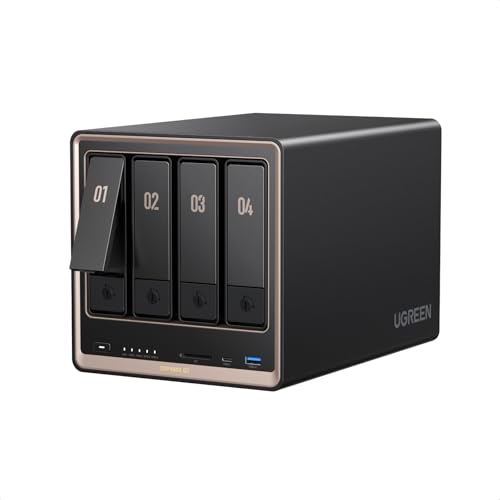
| Model | UGREEN NASync DXP4800 GT |
|---|---|
| HDD Bays | 4x 3.5"/2.5" SATA |
| M.2 NVMe Slots | 2x M.2 SSD slots |
| CPU | AMD Ryzen Embedded R2514 (4 cores, 8 threads) |
| RAM | 8GB DDR4 (expandable to 64GB) |
| Network | 2x 10GbE |
| AU Price (UGREEN AU) | $899.99 |
| Stock Status | Listed by UGREEN AU |
Small Team Workflows: Where the Requirements Escalate
Once you move from a single editor to two or more working simultaneously from the same NAS, the calculus changes significantly. Two editors streaming 4K ProRes 422 HQ simultaneously need around 1.5Gbps of sustained read throughput. That exceeds 1GbE, but remains below the nominal capacity of a 2.5GbE link; actual headroom depends on protocol overhead, storage throughput and other traffic. The practical options are:
- 10GbE to each editor station: Each editor gets up to ~1,100MB/s dedicated bandwidth. This requires a 10GbE-capable NAS and a 10GbE switch (budget separately for a 5-8 port 10GbE switch).
- Link aggregation on 2.5GbE: Bonding dual 2.5GbE ports gives a theoretical 5Gbps aggregate. But only benefits multiple simultaneous clients, not a single fast editor. Good for 2-3 editors on proxy workflows.
- Thunderbolt direct attach: Point-to-point Thunderbolt gives one editor near-NVMe speeds with no network overhead. The DXP480T Plus supports this, but it is not sold in AU.
For most small Australian production teams (2-4 editors), the right answer is a 10GbE-capable NAS connected to a 10GbE switch, with each editing workstation on 10GbE. This is no longer boutique infrastructure. 10GbE network cards are under $100 and 5-port 10GbE switches are available from brands like QNAP and Netgear.
UGREEN NASync DXP4800 Pro. Best for Small Teams
The DXP4800 Pro is the model that makes the most sense for a small video production team. It uses an Intel Core i3-1315U, a 6-core, 8-thread processor with Intel Quick Sync hardware acceleration. Critically for team workflows, the DXP4800 Pro has built-in 10GbE and 2.5GbE networking; UGREEN's current product specification lists no PCIe expansion slot. Its market price is about $1,086.
The DXP4800 Pro competes directly with Synology DS925+ and QNAP TS-464 in the four-bay prosumer bracket. The UGREEN hardware spec is competitive. The DXP4800 Pro uses an Intel Core i3-1315U, while the Synology DS925+ uses an AMD Ryzen V1500B. But the Synology DSM software ecosystem is more mature and the Synology warranty support through BlueChip in Australia is more straightforward than UGREEN's current direct-import model.
That said, UGOS Pro (UGREEN's operating system) has matured considerably since launch, and for teams running media-centric workflows rather than complex business applications, it covers the bases: SMB/AFP sharing, user permissions, snapshot support, and background transcoding. Don't buy this if you need deep integration with third-party business apps or a mature package ecosystem. Synology wins there. Do consider it if you want strong hardware at a competitive price for a media-focused shared storage role.
| Model | UGREEN NASync DXP4800 Pro |
|---|---|
| HDD Bays | 4x 3.5"/2.5" SATA |
| M.2 NVMe Slots | 2x M.2 NVMe |
| CPU | Intel Core i3-1315U (6-core, 8-thread) |
| RAM | 8GB DDR5 (expandable to 96GB) |
| Network | 1x 10GbE + 1x 2.5GbE |
| PCIe Expansion | None |
| AU Price (UGREEN AU) | $1,149.99 |
| Stock Status | Listed by UGREEN AU |
Pros
- Intel Core i3-1315U with Intel Quick Sync hardware acceleration for media workloads
- Built-in 10GbE port. Essential for multi-editor 4K ProRes workflows
- Two M.2 SSD slots for high-speed working storage alongside HDD archive
- 8GB DDR5 base RAM, expandable up to 96GB
- Listed by UGREEN AU and by several AU retailers
Cons
- Only one 10GbE port; the DXP4800 GT has two
- UGOS Pro software ecosystem less mature than Synology DSM
- Sells direct rather than through a distributor. Warranty goes straight to UGREEN
- Four bays may be limiting for large teams with significant raw footage volumes
UGREEN NASync DXP480T Plus. For Teams Needing Thunderbolt (Not Sold in AU)
The DXP480T Plus adds Thunderbolt 4 connectivity to the DXP4800 Plus hardware foundation. Thunderbolt direct-attach delivers sustained throughput well above what even 10GbE can achieve when connecting a single editor's workstation directly to the NAS. Relevant for 8K RAW workflows or editors who refuse to work from proxies. The Thunderbolt port also enables daisy-chaining other Thunderbolt devices, which suits edit suites already built around Thunderbolt infrastructure.
It makes sense if you have one lead editor who needs maximum throughput and additional editors connecting over the standard 10GbE network. It doesn't make sense if your entire team is on Windows with no Thunderbolt on their workstations. This model is not currently sold via UGREEN's Australian storefront (ai-au.ugreen.com). Check there directly for current availability before planning around it.
| Model | UGREEN NASync DXP480T Plus |
|---|---|
| HDD Bays | None. all-flash design (4x M.2 NVMe) |
| M.2 NVMe Slots | 4x M.2 NVMe |
| CPU | Intel Core i5-1235U (10-core, up to 4.4GHz) |
| RAM | 8GB DDR5 (expandable to 64GB) |
| Network | 1x 10GbE + Thunderbolt 4 |
| Thunderbolt 4 | Yes. Direct attach or daisy chain |
| AU Price (UGREEN AU) | N/A |
| Stock Status | Not sold via UGREEN AU |
High-Capacity Options: DXP6800 Pro and DXP8800 Plus
The six-bay DXP6800 Pro and eight-bay DXP8800 Plus are for production environments where raw storage volume is the primary constraint. Studios archiving large camera RAW libraries, post-production facilities managing multiple concurrent projects, or teams where the NAS also serves as the primary backup destination. Neither is currently sold via UGREEN's Australian storefront (ai-au.ugreen.com). Check there directly for current availability.
The DXP6800 Pro uses an Intel Core i5-1235U processor. Useful if the NAS is also running transcoding services, containerised applications, or acting as a local media server alongside its shared storage role. The DXP8800 Plus returns to the i5-1235U but adds two more bays for sheer capacity. At eight bays with 20TB drives (which now consistently exceed $200 AUD per drive given current HDD market conditions), you're looking at up to 160TB raw. Enough for even a well-stocked documentary archive.
Don't buy either of these models if you're a solo editor or a two-person team. The capacity is overkill, and until UGREEN AU lists them for sale, they aren't a practical option anyway. These are facility-grade specs worth knowing about, not a current AU purchase path.
What About the DH2300 and DH4300 Plus? (Entry-Level HDD-Only Models)
UGREEN AU currently lists the DH2300, DH4300 Plus, DXP2800 GT, DXP4800 GT and DXP4800 Pro for sale. The DH2300 uses a Rockchip A72+A53 8-core processor, while the DH4300 Plus uses a Rockchip RK3588. Capable enough for general NAS duties and light transcoding, but not the right choice for active video editing workflows. These ARM processors lack the headroom for simultaneous proxy generation and file serving under load, and neither model includes M.2 NVMe slots, which removes the fast-cache architecture that makes the DXP series useful for media work.
These are the right models for a general-purpose home NAS, media streaming to Plex or Jellyfin, or a small office file share. They are not the right tools for ProRes workflows, multi-editor shared storage, or any situation where sustained throughput above 100MB/s is required. If you're reading this article looking for a video editing NAS, the DH-series is not your answer. But it's worth knowing they're in stock if your needs are more modest than the headline suggests.
Drives not included: All UGREEN NASync units are sold diskless. Budget for NAS-grade HDDs separately. 4TB NAS drives have risen significantly in price through 2025-2026 and now consistently exceed $200 AUD per drive. For a four-bay RAID 5 build, factor in three or four drives at current market rates. Check Scorptec or PLE for current drive pricing before finalising your budget.
Network Infrastructure: Don't Bottleneck a Good NAS
The most common mistake editors make when setting up a NAS for video work is under-investing in network infrastructure. A DXP4800 Pro connected via 1GbE will deliver the same throughput as an entry-level NAS. Both cap at around 110MB/s real-world. The NAS hardware is irrelevant if the network is the bottleneck.
For a solo editor using proxy workflows: 2.5GbE is sufficient and doesn't require replacing your existing switch if you're running a modern home router with a 2.5GbE port. Network configurations vary substantially across the NASync range, so check the exact model's LAN ports before planning a direct 2.5GbE connection.
For a small team doing native 4K work: invest in a 10GbE switch. Budget $400-600 AUD for a five-port 10GbE managed switch, and $60-100 per editing workstation for a 10GbE NIC. This infrastructure cost is real but one-time, and it eliminates network throughput as a variable in your workflow for years.
On NBN connections, typical upload speeds on an NBN 100 plan average around 20Mbps real-world. Well below what you'd need to stream 4K footage remotely in real time. Cloud-based review workflows using Frame.io or LucidLink handle this through adaptive streaming, but don't expect to pull raw camera files over a standard NBN connection. Local network performance is what matters for active editing. Some Australian internet services use CGNAT depending on the retail service provider and plan, which can prevent unsolicited inbound connections unless the provider offers an opt-out, public IP or static IP. Plan accordingly if remote access is part of your workflow.
Buying UGREEN in Australia: What You Need to Know
UGREEN sells its NASync NAS range direct through the UGREEN AU store at UGREEN AU rather than through a third-party distributor. This has practical implications for buyers:
- Warranty support: Claims are handled directly through UGREEN AU, with a 2-year warranty on most models (warranty length varies by model), 30-day returns, and a 30-day price match included, a shorter chain than brands like Synology, where BlueChip sits between the retailer and the manufacturer.
- Stock volatility: Without distributor-held stock in Australia, supply depends entirely on what UGREEN ships directly.
- Price consistency: The upside of direct sale is price stability. UGREEN doesn't have retailer margin stacked on top, which is why the AU prices are competitive with equivalently-specced Synology and QNAP models sold through the retail channel.
- Amazon AU: Some UGREEN NAS models appear on Amazon AU through marketplace sellers. Support and warranty pathways can vary by Amazon seller and listing, so check the seller, warranty terms and return policy before purchasing.
Until then, factor the support risk into your purchase decision. Particularly for business-critical deployments where downtime has a dollar cost.
Australian Consumer Law: When purchasing from the UGREEN AU store or any Australian-registered retailer, Australian Consumer Law protections apply. This includes statutory guarantees around acceptable quality and fitness for purpose that exist independently of the manufacturer's warranty period. Grey-market or parallel-import purchases still carry the usual consumer guarantee rights, but a manufacturer's Australian warranty may not apply and enforcing those rights against an overseas seller can be practically and legally more difficult.
UGREEN NASync vs Synology and QNAP for Video Editing
4-Bay NAS for Video Editing: UGREEN vs Synology vs QNAP (AU Pricing, March 2026)
| UGREEN DXP4800 Pro | Synology DS925+ | QNAP TS-464 | |
|---|---|---|---|
| CPU | Intel Core i3-1315U (6-core) | AMD Ryzen V1500B (4-core) | Intel Celeron N5095 (4-core) |
| RAM (base) | 8GB DDR5 | 4GB DDR4 | 8GB DDR4 |
| 10GbE | Built-in (1x 10GbE) | Not supported (2x 2.5GbE) | Built-in 2.5GbE, PCIe option |
| M.2 NVMe | 2x M.2 | 2x PCIe 3.0 | 2x PCIe 3.0 |
| AU Price (unit only) | about $1,086 | about $1,099 | $1,099 |
| Software ecosystem | UGOS Pro (maturing) | DSM (market-leading) | QTS (feature-rich) |
| AU distributor/warranty | No AU distributor (direct) | BlueChip (strong local support) | BlueChip (strong local support) |
| Stock reliability (AU) | Check current listings | Consistently available | Consistently available |
The DXP4800 Pro uses an Intel Core i3-1315U, so this comparison does not establish a CPU or transcoding-performance lead over the Synology DS925+ or QNAP TS-464; like-for-like benchmark evidence would be needed to make that claim. What it gives up is software maturity and local support infrastructure. Synology DSM remains the benchmark for NAS software. Its Active Backup for Business, Surveillance Station, and media management tools are years ahead of what UGOS Pro offers today. If software depth matters to your workflow, Synology justifies its presence in the market. If you're running SMB shares and need raw CPU muscle for media work, UGREEN is a legitimate alternative worth considering once stock availability and distributor support normalise in Australia.
Naming note: the comparison above uses the DXP4800 Pro, which has an Intel Core i3-1315U, 8GB DDR5 expandable to 96GB and 1x 10GbE + 1x 2.5GbE. It takes the place of the DXP4800 Plus, which UGREEN AU no longer lists.
Drive Recommendations for Video Editing NAS Builds
UGREEN publishes a compatibility list for each NASync model. Always verify your chosen drives against it before purchasing. For video editing workloads, NAS-rated drives are non-negotiable: they're designed for 24/7 operation and handle the vibration from multiple spinning drives in the same enclosure far better than desktop-grade alternatives.
Current picks for NAS-grade HDD in Australia include the Seagate IronWolf and WD Red Plus families. HDD pricing has risen significantly from 2024 lows: the Seagate IronWolf 4TB has a market price of about $351 and the WD Red Plus 4TB about $359. Budget accordingly. For the NVMe cache slots in DXP-series units, any PCIe 3.0 or 4.0 NVMe SSD on the UGREEN compatibility list will work. The Samsung 980/990, WD Black SN770, and Seagate FireCuda series are all reliable options available at Australian retailers.
Related reading: our NAS buyer's guide, our AU retailer guide, and our UGREEN brand guide.
Free tools: Transfer Speed Estimator and NAS Sizing Wizard. No signup required.
See also: our complete UGREEN NAS Australia guide.
See also: our full Photo and Video Storage guide.
Looking for UGREEN accessories?
UGREEN also makes chargers, power banks, USB-C docks, wireless chargers, Ethernet adapters and storage accessories. We have sorted the Australian range into the products actually worth considering.
Browse UGREEN accessories →Can I edit 4K ProRes footage directly from a UGREEN NASync over a standard network?
It depends on your network connection speed. 4K ProRes 422 HQ requires sustained throughput of around 750Mbps. Which exceeds what a 1GbE connection can deliver. On DXP models equipped with 2.5GbE, real-world throughput can provide enough bandwidth for a single 4K ProRes 422 HQ stream with headroom, subject to the storage array and workload. For native 4K ProRes editing with multiple simultaneous streams. Or any 6K/8K RAW work. You need a 10GbE connection. The DXP4800 Pro (one 10GbE port) and DXP4800 GT (two 10GbE ports) both include built-in 10GbE networking. On a 1GbE network, use a proxy workflow where the NAS generates lower-resolution proxies for editing.
How many editors can work simultaneously from a UGREEN NASync DXP4800 Pro?
The number of simultaneous editors a DXP4800 Pro can support depends on codec bitrate, stream count, RAID layout, drive performance, network configuration and other NAS activity; test the intended workflow rather than relying on a fixed editor count. At which point NVMe cache helps, but a six-bay or eight-bay unit with more spindle count gives you more sustained sequential throughput.
Is UGOS Pro (UGREEN's NAS OS) ready for professional video production use?
UGOS Pro covers the core requirements for a video production NAS: SMB and AFP network shares, user and group permissions, snapshot-based data protection, and basic media management. It supports Docker for containerised apps, which opens up tools like Jellyfin, Plex, and Tdarr for media management and transcoding. What it doesn't offer (yet) is the depth of Synology DSM's package ecosystem, Active Backup for Business-style workstation backup, or Synology's mature Surveillance Station equivalent. For teams whose NAS role is purely shared media storage and file serving, UGOS Pro is adequate. For teams wanting the NAS to also run complex applications, handle domain integration, or serve multiple business roles simultaneously, DSM remains the more capable platform.
What happens if my UGREEN NASync needs warranty service in Australia?
UGREEN sells direct through its own official UGREEN AU store, so warranty service is handled directly through UGREEN AU rather than through a local distributor network, with a 2-year warranty on most models, 30-day returns, and a 30-day price match included. Australian Consumer Law still applies if you purchased from the UGREEN AU store (an Australian-registered business), providing statutory protections beyond the manufacturer's warranty period.
UGREEN AU's current NAS range and stock status change over time, so check the live storefront before choosing a model. Should I wait or buy something else?
Stock status changes regularly and there's no reliable public timeline for UGREEN restocking in Australia. If your workflow is blocked right now and you need storage immediately, the pragmatic answer is to look at alternatives. Synology and QNAP equivalents are consistently available through Scorptec and PLE, with reliable local distributor support through BlueChip. If you have flexibility and specifically want UGREEN hardware for the CPU-per-dollar value, monitor the UGREEN AU store and sign up for restock notifications. Don't plan a production deployment around a purchase you can't make today. The stock situation makes it too unpredictable to build timelines around.
Can I access my UGREEN NAS remotely for review and collaboration?
Yes, with some caveats. UGOS Pro includes UGREEN's remote access functionality, which works similarly to Synology QuickConnect. A relay-based connection that doesn't require port forwarding. For reviewing footage, sharing cuts, or accessing project files over the internet, this covers most use cases. However, upload speeds on NBN connections are a real constraint: typical NBN 100 plans deliver around 20Mbps real-world upload, which means streaming high-bitrate ProRes remotely is impractical without transcoding to a lower-bitrate proxy first. For team review workflows, a tool like Frame.io handles this better than direct NAS access. Also note that some NBN connections. Particularly Fixed Wireless and some HFC services. Are behind CGNAT, which can block direct remote access. In those cases, Tailscale or a VPN service provides a workaround.
Check current UGREEN NASync pricing and stock availability at the UGREEN AU store, and compare with Synology and QNAP equivalents at Scorptec and PLE before making your decision.