Asustor often offers competitive hardware specifications for its price. Intel N5105 4-bay units for less than equivalent Synology models, with 2.5GbE networking at price points where Synology still ships 1GbE. The trade-off is a smaller app ecosystem (ADM versus DSM), less polished software, and a narrower support infrastructure. This guide covers selected Drivestor, Nimbustor, Lockerstor, and first-generation Flashstor models, with per-model recommendations by use case, performance expectations, and the honest cases where Asustor is the wrong choice. Australian pricing, retailer availability, and warranty notes are in the AU section below.
In short: The Asustor Drivestor 4 Pro AS3304T V2 (about $545) is the best all-round Asustor NAS for most Australian buyers. 4 bays and 2.5GbE networking for home backups and Plex direct play; do not assume Plex hardware transcoding support. If you need stronger performance for Docker containers or virtual machines, step up to the Lockerstor 4 Gen2+ AS6704T v2 (about $1,049). For all-flash SSD storage, the Flashstor 6 FS6706T (about $611) is hard to beat on value.
Why Asustor?
Asustor is a subsidiary of ASUS and has been building NAS devices since 2011. They have historically been the third option behind Synology and QNAP in Australia, but their 2024-2026 lineup has closed the gap significantly. Their operating system, ADM (Asustor Data Master), is mature and capable. Not as polished as Synology's DSM, but more open than QNAP's QTS when it comes to third-party app support and Docker flexibility.
The biggest practical advantage of Asustor in Australia right now is hardware value. Compare equivalent models: Asustor ships 2.5GbE as standard on its mid-range units where Synology only recently added it to the DS225+ and DS425+ series. HDMI is available on Nimbustor Gen2, Lockerstor Gen2/Gen2+, and first-generation Flashstor models, but not on Drivestor or Lockerstor Gen3. Something Synology dropped years ago. And Asustor's Celeron N5105-based units (Nimbustor, Lockerstor Gen2) offer genuine hardware transcoding capability for Plex at a lower price than comparable Synology Plus models.
Asustor's distribution model differs from Synology and QNAP. Stock availability can be inconsistent at times, particularly for top-tier Lockerstor models. Check retailer stock before committing. Warranty and purchasing details are in the AU section below.
Best Asustor NAS Models by Use Case
Best Budget NAS: Asustor Drivestor 2 Lite AS1102TL
The Drivestor 2 Lite is Asustor's entry-level NAS and the cheapest way to get a proper 2-bay NAS from a reputable brand in Australia. The Asustor Drivestor 2 Lite AS1102TL has a market price of about $299, while the Synology DS124 has a market price of about $260. The AS1102TL gives you two bays instead of one, making RAID 1 mirroring possible from day one.
The Realtek RTD1619B CPU and 1GB RAM mean this is strictly a file storage and backup device. The AS1102TL supports Surveillance Center with four free camera channels and up to 12 channels with additional licences, although its 1GB RAM limits workload headroom. It handles SMB file sharing, Time Machine backups, and basic cloud sync duties well. And that is exactly what most first-time NAS buyers actually need.

| CPU | Realtek RTD1619B Quad-Core 1.7GHz |
|---|---|
| RAM | 1GB DDR4 (not expandable) |
| Drive Bays | 2x 3.5" SATA |
| Network | 1x 1GbE |
| USB | 1x USB 3.2 Gen 1, 1x USB 2.0 |
| AU market price | about $299 |
| Cheapest AU listing | $266.30 (Computer & Parts Land) |
Pros
- Cheapest 2-bay NAS from a major brand in Australia
- Low power consumption. Runs quietly 24/7
- Solid for basic file storage and automated backups
- ADM software is straightforward to set up
Cons
- Only 1GB RAM. No room for apps beyond basics
- 1GbE networking only. Slow for large file transfers
- No HDMI output
- No hardware transcoding. Plex will struggle with anything beyond direct play
Best All-Round NAS: Asustor Drivestor 4 Pro AS3304T V2
The Drivestor 4 Pro Gen2 is the sweet spot in Asustor's 2026 lineup. It keeps the Realtek RTD1619B processor of the budget Drivestor models but steps up to 2GB RAM, four bays and, critically, 2.5GbE networking. The AS3304T V2 has a market price of about $545 and delivers 4-bay NAS capability with faster-than-gigabit networking at a price that Synology simply cannot match. The nearest Synology equivalent, the DS423, has a market price of about $639 and uses a similar ARM CPU but only offers 1GbE.
This NAS suits households with multiple devices backing up, a shared media library, or anyone wanting to centralise files across a home network. The 2.5GbE port means you can saturate it with a compatible switch or direct connection at roughly 280MB/s. Nearly three times faster than standard gigabit. The 2.5GbE port accelerates local transfers, but cloud-backup uploads remain limited by your internet upload speed, though keep in mind typical NBN upload speeds cap around 20-50Mbps depending on your plan and technology type.

| CPU | Realtek RTD1619B Quad-Core 1.7GHz |
|---|---|
| RAM | 2GB DDR4 (not expandable) |
| Drive Bays | 4 x SATA3 6Gb/s; 3.5" HDD/2.5" HDD/SSD |
| Network | 1x 2.5GbE |
| USB | 3x USB 3.2 Gen 1 |
| AU market price | about $545 |
| Cheapest AU listing | $489 (Computer Alliance, MSY, UMart) |
| Warranty | 3 years |
Pros
- 2.5GbE networking at a price point where Synology still ships 1GbE
- 4 bays allow RAID 5 for a good balance of capacity and protection
- Quiet and energy-efficient for 24/7 operation
- Best value 4-bay NAS in Australia under $600
Cons
- 2GB RAM is not expandable. Limits app headroom
- No hardware transcoding for Plex (direct play only)
- ARM CPU means Docker support is limited compared to x86 models
- No HDMI output on the V2 revision
Best for Plex and Media: Asustor Nimbustor 4 AS5404T
If Plex is a primary reason for buying a NAS, the Nimbustor 4 is the Asustor model to look at. The Intel Celeron N5105 processor provides genuine hardware transcoding. Meaning it can convert video on the fly for devices that cannot direct play the original format. This matters if you stream to phones, tablets, older smart TVs, or remote clients over the internet where bandwidth-adaptive transcoding is essential.
The Nimbustor 4 AS5404T has a market price of about $749, and the Synology DS425+ has a market price of about $899. The AS5404T costs less while offering 4GB of RAM versus Synology's 2GB, dual 2.5GbE ports, and HDMI 2.0b output for direct media playback without a separate streaming device. The gaming-inspired chassis design is polarising. It will not win any living room aesthetics awards. But the internals are strong for the price.
For remote Plex access over the internet, be aware that CGNAT can prevent direct Plex connections and port forwarding, although Plex Relay may still provide limited remote streaming. Check with your ISP whether you can get a static or public IP. Check whether your ISP offers a public or static IP address and whether a fee applies.

| CPU | Intel Celeron N5105 Quad-Core 2.0GHz (burst 2.9GHz) |
|---|---|
| RAM | 4GB DDR4 (expandable to 16GB) |
| Drive Bays | 4x 3.5"/2.5" SATA + 4x M.2 NVMe |
| Network | 2x 2.5GbE |
| HDMI | 1x HDMI 2.0b |
| USB | 3x USB 3.2 Gen 2 (10Gbps) |
| AU market price | about $749 |
| Cheapest AU listing | $649 (PLE Computers) |
| Warranty | 3 years |
Pros
- The Intel N5105 supports Plex hardware-accelerated transcoding; simultaneous-stream capacity varies by media and transcoding settings.
- 4GB RAM expandable to 16GB. Room for Docker and apps
- Dual 2.5GbE with link aggregation support
- HDMI output for direct media playback
- M.2 NVMe slots for SSD caching
Cons
- Gaming-style chassis design is not for everyone
- No 10GbE option without a USB adapter
- Plex Pass required for hardware transcoding
- Fan noise under load is noticeable in quiet rooms
Best for Power Users and Docker: Asustor Lockerstor 4 Gen2+ AS6704T V2
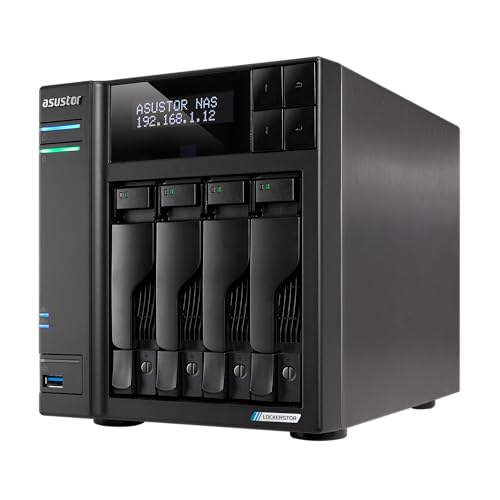
The Lockerstor 4 Gen2+ (AS6704T V2) is Asustor's mid-range workhorse and the NAS that suits technically-minded users who want to run Docker containers, virtual machines, or heavier workloads alongside file storage. It shares the same Intel Celeron N5105 as the Nimbustor but comes in a more professional chassis with better build quality and thermals.
The Lockerstor 4 Gen2+ (AS6704T V2) replaces the original Gen2 at most Australian stores, and the AS6704T V2 has a market price of about $1,049. It keeps the Intel Celeron N5105 and moves networking up to dual 5GbE. You get an x86 NAS with 4GB of RAM (expandable to 16GB), four M.2 slots, HDMI output and a PCIe slot for an optional 10GbE card. It costs about the same as the Synology DS925+, so the choice comes down to the Asustor's four M.2 slots, 5GbE ports and HDMI output against Synology's software.
| CPU | Intel Celeron N5105 Quad-Core 2.0GHz (burst 2.9GHz) |
|---|---|
| RAM | 4GB DDR4 (expandable to 16GB) |
| Drive Bays | 4x 3.5"/2.5" SATA + 4x M.2 NVMe |
| Network | 2x 5GbE, plus a PCIe slot for an optional 10GbE card |
| HDMI | 1x HDMI 2.0b |
| USB | 2x USB 3.2 Gen 2, 1x USB 2.0 |
| AU market price | about $1,049 |
| Cheapest AU listing | $944.37 (MegaBuy) |
| Warranty | 3 years |
Pros
- Same capable N5105 CPU as Nimbustor in a more professional chassis
- Excellent Docker and container support with Portainer
- Expandable RAM means future headroom for heavier workloads
- Dual 5GbE, with a PCIe slot for an optional 10GbE card
- Four M.2 NVMe slots and HDMI 2.0b output
Cons
- Costs about the same as the Synology DS925+, whose DSM software is more polished
- Same N5105 CPU as the cheaper Nimbustor models, so the premium buys networking and chassis, not processing power
- No 10GbE built-in
- ADM app ecosystem is smaller than Synology's DSM
Best All-Flash SSD NAS: Asustor Flashstor 6 FS6706T
The Flashstor 6 is one of the most unique NAS products on the Australian market. It is an all-flash NAS with six M.2 NVMe SSD slots, dual 2.5GbE networking, and the Intel N5105 CPU. All in a tiny form factor barely larger than a Mac Mini. For video editors, photographers, and anyone working with large files who needs fast local storage, this is a compelling device.
The Flashstor 6 FS6706T has a market price of about $611 and is remarkably affordable for what it offers. You supply your own M.2 NVMe SSDs and get a near-silent, actively cooled NAS with sequential read/write speeds that dwarf any spinning-disk NAS. The catch is capacity: Six 4TB drives provide 24TB raw; compatible 8TB models can provide up to 48TB raw. For bulk storage, a traditional HDD-based NAS is still the practical choice.

| CPU | Intel Celeron N5105 Quad-Core 2.0GHz |
|---|---|
| RAM | 4GB DDR4 (expandable to 16GB) |
| Drive Bays | 6x M.2 2280 NVMe (PCIe Gen 3x1) |
| Network | 2x 2.5GbE |
| HDMI | 1x HDMI 2.0b |
| USB | 2x USB 3.2 Gen 2 (10Gbps) |
| AU market price | about $611 |
| Cheapest AU listing | $580 (Computer & Parts Land) |
| Warranty | 3 years |
Pros
- Near-silent operation. No spinning disks, minimal fan noise
- Extremely compact form factor
- Fast NVMe SSD performance for editing workflows
- HDMI output and hardware transcoding supported
- The FS6706T starts at $580 (Computer & Parts Land), outstanding value for an all-flash NAS
Cons
- Limited to M.2 2280 NVMe. No 3.5" HDD bays
- Maximum raw capacity is limited by NVMe SSD sizes and pricing
- PCIe Gen 3x1 per slot limits individual drive speed
- Not practical for bulk storage. Use a traditional NAS for that
Best for Business: Asustor Lockerstor 4 Gen3 AS6804T
The Lockerstor Gen3 range is Asustor's top-tier desktop line, built on the AMD Ryzen V3C14 platform with 16GB ECC RAM, dual 10GbE and dual 5GbE networking. The AS6804T has a market price of about $2,014. The Synology DS925+ has a market price of about $1,089, and the QNAP TS-464 has a market price of about $1,114, so both cost substantially less than the AS6804T, which has substantially more powerful hardware.
The Ryzen V3C14 is a genuine embedded server-class processor, and 16GB of ECC (error-correcting) RAM provides reliability features typically found in enterprise equipment costing significantly more. Dual 5GbE networking is faster than the 2.5GbE standard on competing brands and does not require the expense of 10GbE switches and cabling. For small businesses running file sharing, backup, surveillance, and potentially a few Docker containers or VMs, this is a strong platform.
Check current Australian retailer listings before ordering a Gen3 model.

| CPU | AMD Ryzen V3C14 Quad-Core 2.3GHz |
|---|---|
| RAM | 16GB DDR5 ECC (expandable to 64GB) |
| Drive Bays | 4x 3.5"/2.5" SATA + 4x M.2 NVMe |
| Network | 2x 10GbE + 2x 5GbE |
| HDMI | No HDMI |
| USB | 3x USB 3.2 Gen 2 Type-A + 2x USB4 Type-C |
| AU market price | about $2,014 |
| Cheapest AU listing | $1,999 (Computer & Parts Land, Computer Alliance) |
| Warranty | 3 years |
Pros
- Ryzen V3C14 with 16GB ECC RAM. Serious performance for a desktop NAS
- Dual 5GbE is faster than competitors without needing 10GbE infrastructure
- Dual 10GbE ports built in, alongside the dual 5GbE
- Expandable to 64GB RAM for heavy virtualisation
Cons
- Premium pricing. Synology and QNAP offer more software polish for less
- Stock availability is inconsistent in Australia
- Overkill for basic home use. The Gen2 models are better value for most buyers
- ADM software ecosystem remains smaller than DSM or QTS
Asustor Lineup Comparison
Asustor NAS Range. Key Models Compared
|
Drivestor 2 Lite AS1102TL
|
Drivestor 4 Pro V2 AS3304T V2 |
Nimbustor 4 AS5404T
|
 Lockerstor 4 Gen2+ AS6704T v2
|
Flashstor 6 FS6706T
|
Lockerstor 4 Gen3 AS6804T
|
|
|---|---|---|---|---|---|---|
| CPU | Realtek RTD1619B | Realtek RTD1619B | Intel Celeron N5105 | Intel N5105 | Intel Celeron N5105 | AMD Ryzen V3C14 |
| RAM | 1GB | 2GB | 4GB (to 16GB) | 4GB (to 16GB) | 4GB (to 16GB) | 16GB ECC (to 64GB) |
| Bays | 2x 3.5" | 4 x SATA3 6Gb/s; 3.5" HDD/2.5" HDD/SSD | 4x 3.5" + 4x M.2 | 4x 3.5" + 4x M.2 | 6x M.2 NVMe | 4x 3.5" + 4x M.2 |
| Network | 1GbE | 2.5GbE | 2x 2.5GbE | 2x 5GbE | 2x 2.5GbE | 2x 10GbE + 2x 5GbE |
| HDMI | No | No | Yes (2.0b) | Yes (2.0b) | Yes (2.0b) | No |
| Plex Transcoding | No | No | Yes | Yes | Yes | Yes |
| Best Use | Basic backup | Home storage | Media server | Docker/power user | SSD editing | Small business |
| AU market price | about $299 | about $545 | about $749 | about $1,049 | about $611 | about $2,014 |
| Cheapest AU listing | $266.30 (Computer & Parts Land) | $489 (Computer Alliance, MSY, UMart) | $649 (PLE Computers) | $944.37 (MegaBuy) | $580 (Computer & Parts Land) | $1,999 (Computer & Parts Land, Computer Alliance) |
🇦🇺 Australian Buyers: Where to Buy, Pricing, and Warranty
Asustor NAS devices are available from several Australian retailers, with pricing varying noticeably between stores. No single store is cheapest across the whole range, so always check multiple retailers before purchasing. The same model can vary noticeably between retailers.
Asustor's Australian distribution runs primarily through Dicker Data. Check current retailer listings for the specific model you need.
The real difference between retailers is pre-sales knowledge and post-sales support. For a product that stores your data, the retailer relationship matters when something goes wrong. Specialist retailers like Scorptec and PLE can provide genuine guidance that Amazon and marketplace sellers cannot.
Who to contact if it fails: Your first step for a faulty product is usually the retailer that sold it. The ACCC explains your rights under the Australian Consumer Law at accc.gov.au. Asustor does not have a service centre here, and warranty processes, including resolution times, vary between retailers. Before buying, ask your retailer: "If this fails, what is your process? Can I get an advanced replacement?" The answer tells you more about the value of buying from that retailer than the price on the website.
How ADM Compares to DSM and QTS
Asustor's operating system, ADM (Asustor Data Master), is functional and mature but lacks the polish of Synology's DSM. Where DSM feels like a commercial product with dedicated UX design, ADM feels more utilitarian. It gets the job done without being particularly elegant about it. That said, ADM 5.1.4 (the current version) has improved significantly from earlier releases, with a cleaner interface and better mobile app support.
Where ADM genuinely excels is openness. Asustor makes it easy to install Docker via Portainer, run third-party apps, and access the underlying Linux system. If you want to tinker, customise, or run non-standard workloads, ADM gets out of your way in a manner that Synology's more locked-down approach does not. QNAP's QTS sits somewhere in between. More flexible than DSM, but ADM still edges it for pure Docker and Linux friendliness.
The trade-off is in first-party apps. Synology's ecosystem, including Synology Photos, Drive and Surveillance Station, is significantly more polished than Asustor's equivalents. If you rely heavily on first-party mobile apps for photo backup or cloud sync, Synology is still the better choice. If you are comfortable with self-hosted alternatives (Immich for photos, Nextcloud for sync, Tailscale for remote access), Asustor's hardware value makes more sense.
What About the Gen2+ Models?
The four-bay Gen2+ model is AS6704T v2. It retains the Intel N5105 while upgrading networking from dual 2.5GbE to dual 5GbE.
If you are considering a Lockerstor 2 or 4, compare the Gen2 and Gen2+ pricing carefully before purchasing. The Gen2 is usually the cheaper model and may represent better value unless the Gen2+ brings a processor or feature upgrade that justifies the premium. Check Asustor's product pages for confirmed specifications before committing.
Drives and Storage Planning
All Asustor NAS units are sold diskless. You need to supply your own hard drives or SSDs. For 3.5" HDD bays, stick with NAS-rated drives: Seagate IronWolf or WD Red Plus are the standard choices in Australia. NAS-grade drive prices have risen significantly from early 2025 levels, so factor drive costs into your total budget when comparing NAS models.
Check the exact SSD model number, capacity and firmware against ASUSTOR's FS67 compatibility list before purchasing. Keep in mind that the Flashstor 6 uses PCIe Gen 3x1 per slot, so A Gen 4 SSD is limited to the NAS's PCIe Gen 3 x1 link speed, though drive-level performance can still vary. Buy accordingly and save the premium SSD money for other components.
A NAS is not a backup. Whether you buy a Drivestor or a Lockerstor, plan for hardware failure. Accept that NAS hardware failure is a matter of when, not if. Build your data protection strategy around the assumption that your NAS will eventually fail. Offsite backup, cloud sync, or a secondary NAS. Plan for a 2-3 week replacement window as the realistic timeline for warranty resolution in Australia.
Who Should Not Buy Asustor
Don't buy Asustor if you prioritise first-party software polish above all else. Synology's DSM and its mobile apps (Photos, Drive, Surveillance Station) are genuinely better than Asustor's equivalents. If you want a NAS that works like an appliance with minimal tinkering, Synology is the safer choice. You pay more for the hardware, but the software experience is consistently smoother.
Don't buy Asustor if your deployment requires a specific enterprise or rackmount model on a fixed schedule. Synology is distributed in Australia through BlueChip and MMT, and QNAP through BlueChip. Check current retailer listings before choosing a platform for a time-sensitive business purchase.
Don't buy Asustor if you need enterprise-grade support infrastructure. Asustor's Australian presence is minimal compared to Synology and QNAP, and the support chain through Dicker Data is newer and less tested. For deployments where downtime directly costs money, the established support networks of the bigger brands reduce risk.
Related reading: our NAS buyer's guide, our Synology vs QNAP comparison, and our AU retailer guide.
Use our free NAS Sizing Wizard to work out how many bays and what size drives you need.
See also: our NAS buying guide hub.
Found the right NAS for your Asustor NAS? Our expert build review checks your full configuration. Compatible drives, RAID, and ADM config. Before you spend. $149 AUD, delivered within 3 business days.
See also: our NAS buying guide hub.
See also: our NAS buying guide hub.
See also: our complete Asustor NAS Australia guide.
Is Asustor as reliable as Synology or QNAP?
Asustor NAS hardware is manufactured by an ASUS subsidiary and uses the same class of components (Intel, AMD, Realtek processors, standard SATA and NVMe interfaces) as Synology and QNAP. The difference is in software maturity and support infrastructure. Synology's DSM has had more years of refinement, and their Australian distribution through BlueChip is more established. Asustor hardware is solid. It is the after-sales support chain that is less proven in Australia.
Can I run Plex on an Asustor NAS?
Yes. Plex runs on every Asustor range, including the ARM Drivestor models; hardware transcoding is where the ranges differ. The Nimbustor (AS5402T/AS5404T), Lockerstor Gen2 (AS6702T/AS6704T/AS6706T), Flashstor, and Lockerstor Gen3 ranges. Intel-based models support hardware transcoding through Plex using Intel Quick Sync, while Plex hardware-transcoding support on AMD-based models is not established. You will need a Plex Pass subscription to enable hardware transcoding. The budget Drivestor models use ARM processors and cannot hardware transcode. On those units Plex can software-transcode only up to 720p (some 1080p), so plan on direct play for larger files.
What warranty do Asustor NAS devices have in Australia?
ASUSTOR's warranty length depends on the model: ASUSTOR states a range of three months to five years, with each model's period on its specifications page. ASUSTOR asks owners to start a warranty claim with the place of purchase. They do not have a service centre in Australia. The claim goes from retailer to Dicker Data (the Australian distributor) to Asustor in Taiwan, then back down the chain. Expect 2-3 weeks minimum for resolution. Your first step for a faulty product is usually the retailer that sold it. The ACCC explains your rights under the Australian Consumer Law at accc.gov.au. NAS warranty and returns in Australia lists each maker's published warranty length and who to contact first.
Should I buy an Asustor NAS from Amazon AU?
Amazon AU sometimes lists Asustor models at competitive prices, and their returns policy is excellent if you want your money back. However, if your NAS fails and you need a direct replacement, Amazon may not have stock. Especially for older or less common models. Replacement options and stock availability can vary by retailer and model. For a device that stores your data, the support relationship matters more than saving a few dollars.
Can I access my Asustor NAS remotely over the internet?
Yes. Asustor provides EZ-Connect, a free relay service that enables remote access without manual port forwarding. Alternatively, you can set up direct remote access via DDNS and port forwarding, or use a VPN solution like Tailscale or WireGuard for a more secure approach. Be aware that some Australian NBN connections use CGNAT (Carrier-Grade NAT), which blocks incoming connections and prevents direct remote access. If you are on CGNAT, contact your ISP to request a public IP address. Most providers will assign one on request. Typical NBN upload speeds of 20-50Mbps will limit remote access performance, so don't expect local-network speeds when accessing files remotely.
How does Asustor NAS pricing in Australia compare to the US?
It varies by model: once GST is included, some Asustor models cost about the same in Australia as in the US, so compare current Australian retailer prices rather than converting a US price. Always compare prices across Scorptec and PLE, as pricing can differ noticeably for the same model. For business purchases, request a formal quote from your preferred retailer.
What is the difference between Drivestor, Nimbustor, Lockerstor, and Flashstor?
Drivestor is Asustor's budget line. ARM processors, basic RAM, 1GbE or 2.5GbE networking. Best for file storage and backups only. Nimbustor is the multimedia-focused range with Intel x86 CPUs, expandable RAM, dual 2.5GbE, and HDMI output. Aimed at Plex users and gamers. Lockerstor is the performance and business line, available in Gen2 (Intel N5105), Gen2+ (Intel N5105 with dual 5GbE), and Gen3 (AMD Ryzen V3C14 with ECC RAM, 10GbE and 5GbE). Flashstor is the all-flash M.2 NVMe range for users who need fast SSD storage in a compact, silent form factor. Each line targets a different use case and budget.
Looking for help choosing the right hard drives for your Asustor NAS? Our guide covers the best NAS-rated drives available in Australia with current pricing from local retailers.